

The struggle to access information at work is real.
Research reveals that a whopping 73% of employees spend 1 to 3 hours every day to find information on a topic.
This time loss is often the root cause of declining productivity, innovation, and creativity in employees. What follows is even worse – delayed projects and inadequate team performance which further impacts your company’s overall success.
Creating an internal wiki can provide an instant solution to these problems.
As a centralized knowledge hub, an internal wiki allows employees to access and share information and collaborate on ideas. It is 24×7 accessible, which means your employees can get the information they need anytime and from anywhere they are.
This blog uncovers the essentials of an internal wiki, including its types, challenges, and how to create one.
What Is an Internal Wiki?
An internal wiki is a one-stop point where employees can find all the information they need to work productively. It acts like a company’s Wikipedia comprising crucial information such as vision and mission, work policies, code of conduct, standard operating procedures, and much more.
An easy-to-use and well-structured platform, an internal wiki delivers relevant page and article suggestions, closely matching employees’ search queries. You can also add images and videos to your internal wiki and publish it across devices, including desktops and mobile phones.
Types of Wiki
There are two major types of wiki you can create, depending on the goals you wish to achieve and the audience you want to target.
Public Wiki
A public or external wiki is designed to help customers self-solve problems. It is like a self-service help center that lets customers address challenges on their own without relying too much on your support team. A significant benefit of a public wiki is that it helps reduce your support tickets and improve customer satisfaction.
Private Wiki
A private wiki or internal wiki is meant for your employees. It is a centralized hub of vital company information that helps existing employees, as well as new hires, give their best shot at work. From work processes and policies to codes of conduct and training materials, employees can find everything they need under one roof.
Why Does Your Company Need an Internal Wiki?
Creating a wiki for employees can be game-changing for your business in so many ways.
Let’s take a look at some of them.
1. Bolsters Employee Productivity & Efficiency
Going through email chains and digging into scattered documents to find a single piece of information can leave your employees feeling all drained, with no energy left to focus on the real work.
That’s where an internal wiki helps. As a highly searchable platform, it gives employees fast and instant access to all the information they need to learn on the go and solve problems independently through an internal customer service portal.
The sheer convenience of finding information saves a ton of time and effort, making employees more productive and efficient at work.
2. Supports Employee Onboarding
In the initial days of joining, new hires have a hard time sinking into the company culture. They take weeks and sometimes even months to get familiar with the new job and the people around them.
Implementing a wiki can instantly solve this problem.
It acts as a single source of truth for all new hires to get all the assistance they need to gain ground in a new environment. They will be better positioned to overcome challenges, thus reducing the time-consuming shoulder taps, emails, and calls.
3. Drives Collaboration
Collaboration often takes a backseat when employees do not have a centralized outlet for sharing information and giving feedback. All the valuable knowledge they hold stays in their brains and never gets out for others to consume.
With a company wiki, employees get a shared space to work collectively on articles, share their subject matter expertise, and even give feedback on the information shared by others. Such a collaborative workspace is often the breeding ground for innovation and creativity.
4. Boosts Information Security
Digital information is often prone to theft, unauthorized access, and corruption. If you keep this information in an unprotected environment, the chances of security breaches increase manifold.
The best wiki software out there provides secure hosting services that ensure your company information remains in safe hands.
You can set password controls in the form of single sign-on and two-factor authentication to limit access to only authorized individuals. Furthermore, you can set rules and conditions inside articles to allow or restrict access to specific individuals or groups.
Key Challenges of Traditional Wikis
Traditional wikis come with their own set of challenges and limitations, and that’s why they should be avoided at all costs.
Let’s look at some of the problems you might encounter when working with a traditional wiki.
1. Lack of Structure
Traditional wikis are not that well structured. It almost seems like a platform where information is simply dumped without focusing on the presentation. This lack of structure is often the reason employees find traditional wikis difficult to navigate and use.
2. Accessibility Issues
Traditional wikis are not easy to access on mobile phones. While they work decently on desktops, they are not designed well for mobile devices. Lack of accessibility on mobile phones hampers on-the-go learning for employees.
3. Lack of Analytics
It’s hard to assess the performance of traditional wikis. They lack the necessary analytics to gauge article effectiveness and identify knowledge gaps in your wiki.
Updating and improving the wiki becomes difficult with no data available, leading to a downfall in its quality and relevance.
How to Create an Internal Wiki for Your Employees
Here comes the main event, where we will explore the steps to building a compelling internal wiki that your employees would love to use.
Let’s go!
1. Create a Plan
All big things start small, with a strong plan that lays down a defined path that helps achieve the intended goals.
The same goes true for a corporate wiki.
A full-fledged plan that determines the key stages in the process of creating an internal wiki will give you an excellent headstart right off the bat.
The plan will define the start and end dates of the entire project and the stakeholders to be involved. It will also establish how your internal wiki should look and how it should be shared with your employees.
Not just that, in the planning stage, you can identify the primary goals you would like to achieve with your company wiki.
These goals can be anything, depending on your specific business needs. You can use your internal wiki to streamline employee onboarding, strengthen team collaboration, and improve the overall work culture.
2. Set Up a Structure for Your Wiki
Once you have a plan, the next step is to ready a solid structure for your internal wiki.
Creating a structure involves identifying the broad topics to be covered and the categories to be added to the wiki.
This stage also involves creating a home page where the top categories can be put on display. You can also set up a table of contents where categories can be listed for easy navigation.
The architecture of your wiki should incorporate some vital topics that can help employees do their jobs better. These topics will act as sections that will be easy to fill up for your team.
In fact, your team will have complete clarity about what content should go on which topic, which will help speed up the process of creating your internal wiki.
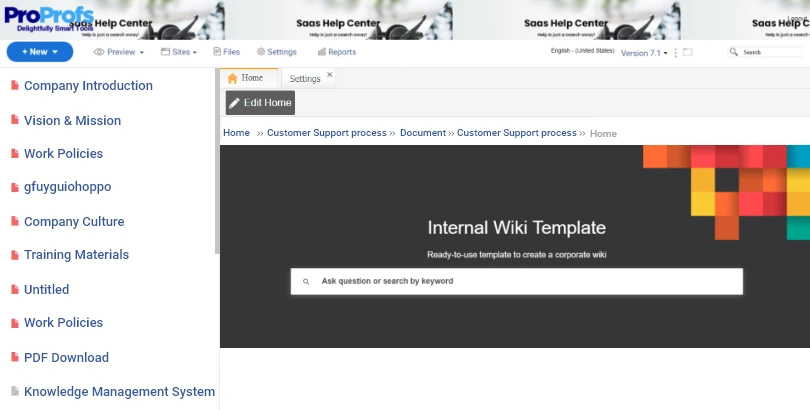
An easy way to get your structure right without putting in a lot of effort is by using templates. Most wiki tools offer pre-designed templates that have a ready-made framework, which means you don’t have to build a structure from the ground up.
This is what a template looks like:
3. Create Content From Scratch or Import Existing Files
It’s now time to fill up those categories with content.
Now, there are two ways to go about this process.
Your team can write everything from scratch, which is more time-consuming, or if you have existing content in Word docs, Excel sheets, or PPTs, you can import them directly into your wiki.
When creating content for internal wiki pages, implement these tips for a flawless output:
- Keep your sentences and paragraphs short and sweet
- Write in the active voice for easy understanding
- Create benefit or action-oriented titles
- Use bulleted points to make content consumption easier
- Use instructional and educational tone
And most importantly, include some breathing space in articles. Do not choc-a-bloc your wiki with unnecessary content that doesn’t provide any value to employees.
4. Allow Teams to Work in Collaboration
For a speedy and successful launch of your wiki, you will need your teams to work together harmoniously when creating content.
Identify the key knowledge holders across teams and bring them on a centralized platform where they can share ideas, insights, and suggestions. A collaborative workspace will boost their creativity and help them come up with innovative solutions.
While the benefits of collaborative working are many, there are also certain drawbacks. There are high chances of conflicts when teams work together, which can stop the entire process in its tracks.
With a powerful tool like ProProfs Knowledge Base, you can tackle this problem easily.
It allows you to assign roles and permissions to each member and group and let them work cohesively without confusion. Setting roles is a great way to ensure members don’t step into each other’s shoes and the entire project goes on unhindered.
Here’s a quick video that will help you learn more about team collaboration.
5. Review, Improve, & Publish
Imagine if you publish the content without fact-checking and proofreading it. Your employees will have a document full of grammatical, structural, and factual errors. What do you think they will feel about your brand?
First, it will leave a negative brand impression, and second, it will force them to question the reliability of your wiki. Next time, they will think twice before referring to your wiki for anything.
This can be avoided if you have a streamlined review process in place.
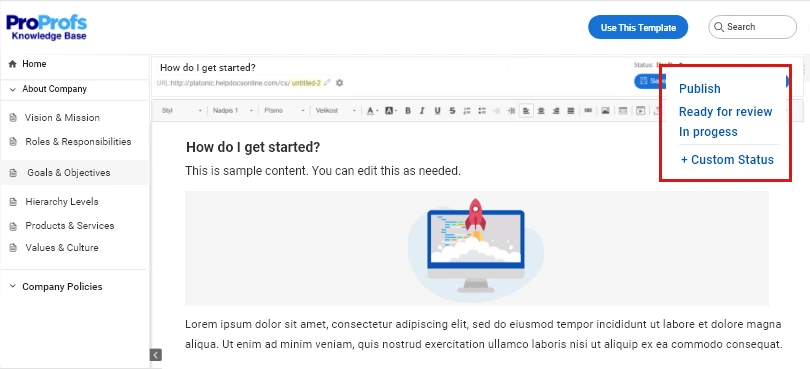
For example, the best internal wiki software out there has features that let you set up a review workflow for every article you create. This workflow involves assigning pre-defined statuses to articles, depending on their stage in the review process.
For example, if a writer is still working on an article, its status can be “In Progress”, while if the article is written and need to be shared for review, the status can be set as “Ready for Review”..
This will bring clarity and transparency to your review process and will ensure that your content is vetted by experts before going live.
6. Measure, Analyze, & Update
Once your wiki is out there for employees to consume, you will need to keep a close eye on its performance.
Is your wiki solving employees’ questions?
Does your wiki have all the information employees need at work?
Does your wiki show relevant suggestions closely matching the search queries?
Answers to these questions will help you identify areas that need your undivided attention.
Now, the question that pops up here is – how do you measure your wiki’s performance?
Most wiki tools these days encompass a powerful reporting system that lets you track metrics like failed searches, poorly rated articles, broken links, and many more.
These metrics, when monitored closely, can give eye-opening insights into the relevance and effectiveness of your wiki. Regular tracking will introduce you to opportunities for new article additions and improvements.
Based on your analysis, you can keep making necessary changes to your wiki so that it stays useful for your employees.
Here’s a quick video to teach you how to analyze these metrics.
How to Choose the Right Internal Wiki Software
Investing in the right wiki software will give wings to your efforts, ensuring that the final output is phenomenal.
Here are the top features you should look for when choosing an internal wiki tool:
- Expert-designed templates: They can be a great help when building content for your wiki. You get a ready-made structure with a table of contents and topic-relevant categories, so you can focus on the work that really matters.
- Access controls: This feature allows you to control the access of your wiki by assigning roles and permissions to users and groups.
- In-depth reports: Using reports, you can analyze your wiki and improve its performance from time to time.
- Password controls: You can keep your corporate wiki secure by setting single sign-on and two-factor authentication.
- Conditional content: Using this feature, you can set rules and conditions at page and folder levels and exercise full control over who can or cannot access your wiki.
- Online editor: Using an online editor, you can write, edit, as well as customize the content to your liking.
It’s Time to Launch Your Internal Wiki
Creating an internal wiki is the best thing you can do for your business.
It is an incredibly valuable asset that helps your teams collaborate and communicate seamlessly with each other. Not just this, productivity and performance also improve when employees have a single source of truth to refer to while working.
If you are looking to create a wiki, start by creating a solid plan and setting the right structure for your wiki. Let your teams work collaboratively towards content creation and review, and also make sure that your wiki is continuously updated and improved.
With a power-packed tool like ProProfs Knowledge Base, launching a wiki gets all the easier. You will have access to the best-in-class features that will help you at every step in creating a fully-functional, highly-searchable wiki for your employees.
Do you want a free Knowledge Base?
We have the #1 Online Knowledge Base Software for instant self-help