

From the smallest of startups to the largest of enterprises, there is only one thing that can guarantee consistent growth and success, and that is customer experience.
Even with rapid technological advancements, many businesses are still stuck in cracking the code to customer happiness.
What makes customers tick? What is the formula to win their hearts?
Besides awesome products and seamless services at bottom-barrel prices, customers desire convenience.
If it takes them tremendous effort to reach out to you for simple issues, wait for hours, days or weeks for a response, you are bound to push customers away and serve them to your competitors.
When it’s about customers’ convenience, nothing can help you better than customer portal software. It helps you build a centralized portal where customers can get access to a self-service help center, FAQs, ticket status, online payments, deliveries, and much more.
Dive into this blog to learn everything about customer portal software.
What Is a Customer Portal?
A customer portal is an online platform designed to make customers independent. It gives them 24×7 access to critical information such as – FAQs, knowledge base, community forum, support requests – basically everything they need to solve issues and stay updated.
It is a one-stop point where customers can check the status of their tickets and track previous ticket details. They can even use it to keep track of payments, deliveries, product updates, or refunds. If they have any questions about a product or service, there are optimized FAQs and a comprehensive knowledge base they can instantly refer to.
In a nutshell, a customer portal is a centralized information center that provides customers with real-time access to important information, right when they need it.
Why Is a Customer Portal Vital for Customer Service?
A customer portal is an effective addition to your customer support system. It’s not just a space where customers can come and get answers. Instead, it’s an all-in-one platform that teaches customers to solve issues independently and keeps them updated about their pending and resolved requests.
It acts as a bridge between you and your customers. The stronger this bridge is, the seamless the customer experience will be.
Here are some of the significant reasons that fortify the importance of a customer portal for customer service.
1. Helps Customers Before They Reach out to You
Technology has brought a ‘Do It Yourself culture,’ where customers like solving issues on their own. They want to be least dependent on you, at least for simple issues that can be addressed at their end.
And why not. Who wants to get the answer – “Thank you for reaching out to us. We will get back to you in two business days.”
You are a customer yourself, and you know how annoying this reply can be when you need immediate resolution. A customer support portal proactively helps your customers, reducing the need to approach your support team now and then.
With more and more customers (88% – according to Statista) expecting brands to offer self-service solutions, a customer portal provides an excellent option to meet this rising need.

For example, if you are an eCommerce company, you can use the customer portal to:
- help customers manage their orders
- track deliveries, payment, and refunds
- Update information quickly
- Get product details and resolve issues on their own
Suppose a customer wants to reschedule a delivery, he or she can use the portal to do the same instead of calling, emailing, or messaging your agents.
Read More: Effective Tips to Promote Self-Service Platform Among Customers
2. Engages Customers Through Community Learning
A customer portal gives your customers the best of both worlds – a self-service knowledge base and community learning.
It acts as a central access point where customers can use the knowledge base to get the latest and detailed information on a particular topic. Simultaneously, they can interact directly with other customers to learn from their experiences and get meaningful advice from them.
For example, a customer who has been using your product for a long time suddenly encounters an issue. He or she can directly raise this issue in the community forum to get quick answers from people who have experienced the same.
Getting-started videos and how-to guides in the knowledge base will serve as a better starting point for new customers. But these customers can also use the forum to learn how others are using the product. This gives them a different perspective, opening doors for more creativity.
Here is an excellent example of a customer portal combining both knowledge base and community forum.
 3. Makes Customers Independent & Agents Efficient
 3. Makes Customers Independent & Agents Efficient
Customers will always have infinite questions. But there is a limit to the times they can email, call or text you. There is also a limit to the number of requests your support team can handle at the moment.
Your team might be adept at handling customer questions, but let’s not forget that human beings have their limitations. Answering repeated questions at a stretch increases the chances of an incorrect response, leading to agent dissatisfaction and customer frustration.
A customer support portal provides a perfect solution to these troubles.
While it turns customers independent by giving them round-the-clock access to information, it reduces the number of tickets reaching your support staff.
Tickets are usually resolved on a first-come, first-serve basis. This means there is a possibility that a serious customer concern might be buried under a heap of common customer issues. When the ticket load decreases, the focus can be shifted to customer concerns screaming for your attention.
Besides, customer portal software also ensures that customers do not have to toil to find your contact details. There is a support form embedded right in the platform that helps customers raise tickets without leaving the customer portal experience.
Read More: How to Reduce Support Tickets With Self-Service Knowledge Base
4. Gives Meaningful Insights
As your company grows and customer expectations increase, how can your support portal remain unchanged?
The customer portal is meant to be an evergreen resource that offers the most updated and relevant content. For that, you have to capture customer feedback, performance insights and leverage the same to improve the portal’s content.
For example, data pertaining to failed searches or poorly performing articles can be used to modify existing pieces or add new content to the portal. Check which article links lead to no results, and fix them to deliver a superior customer experience.
Similarly, track the upvotes and downvotes on articles, customer comments, and the community forum posts to gain a deeper understanding of problematic areas.
Monitoring these metrics is an excellent way to maintain the portal and keep it relevant for your customers.
This quick video will guide you through these performance metrics and how you can track them.
5. Keeps You Prepared to Deal With Rising Customer Issues
As your business grows, the customer base is bound to expand. With more customers becoming a part of your family, there will be a surge in customer issues.
That’s where a customer portal plays its part.
It scales your support system as customer issues increase. Any number of customers can use the portal to address their concerns, raise tickets, and even stay updated on important product developments or process changes.
With self-service having a bright future, customer portal software is all the more essential. According to Gartner, a surprising 85% of customer interactions will begin with self-service by 2022.
You have to be at the top of the self-service game to tap this vast customer base. Employ a customer portal to provide customers a single source of truth, delight them with instant service, and save support costs at the same time.
A Customer Portal Is a Boon for Your Business. Here’s Why.
While traditional routes like email and calls remain a preferred choice for critical customer concerns that require external assistance, they are not the best solution for simple issues that need immediate attention.
A support portal is a crucial touchpoint that puts customers on the driver’s seat, empowering them with instant access to any information they need.
Building a customer portal can provide a bouquet of benefits, such as:
1. Delights Customers With Instant Solutions
Self-service is the best customer service. That’s because it gives customers what they need the most – the feeling of empowerment. Digital customers want everything at their fingertips. The case is no different when it comes to customer service.
Waiting for a response on calls or emails for hours or days is the last thing they want. They want you to value their time as much as you value yours.
In fact, According to Forrester, for two-thirds of customers, valuing their time is the best thing brands can do for good customer service.
No matter how quick and efficient your support staff is, they cannot be as prompt and always available as a self-service knowledge base. With a support portal, customers can find the right help at 5 in the morning or eight at night, from anywhere in the world.
2. A Significant Rise in Agent Productivity
The constant flow of tickets can be overwhelming for your agents. Being surrounded by tickets day in and day doesn’t allow agents to be their productive best at work. The quality of responses starts degrading as the day comes to a close.
With a well-designed support portal, you can maintain a healthy and manageable ticket volume. Since the basic customer issues do not reach your support staff, they can attend to critical concerns that need a hands-on approach.
Instead of giving robotic answers to common questions, agents can utilize their time in solving serious customer challenges. A customer portal saves the unnecessary time and effort of agents that go into catering to repetitive requests.
Read More: How to Shorten your Customer Support Queues
3. Streamlines Your Support Process & Reduces Support Costs
A customer portal is an all-in-one platform that acts as a knowledge source, community forum, and platform for ticket tracking.
Customers can use it to manage and track their interactions with agents. They can go back to the answers received in the past in case a similar issue arises again. It is also possible to keep track of tickets and check their status.
This keeps both agents and customers on the same page. Your agents can also refer to the portal to monitor customer interactions and identify repetitive issues.
What more? Since a support portal reduces the inflow of tickets, the workload becomes manageable. So, even with a small support team, you would be able to provide the best-in-class customer service.
This was all about the unbeatable benefits that a customer portal can provide your customers, agents, and by that extension, your business.
Let’s now quickly go through some of the notable features that a customer portal software must-have.
Salient Features of a Customer Portal Software
The astounding benefits of a support portal might have convinced you to go for customer portal software. While the market is awash with similar tools, how to analyze, compare, and zero in on the one tool that will be perfect for your business?
It’s simple. Just look at the features they provide. Features are the windows that give a peek into the tool’s effectiveness. Below are the top customer portal features that you should look out for.
1. Effortless Authoring
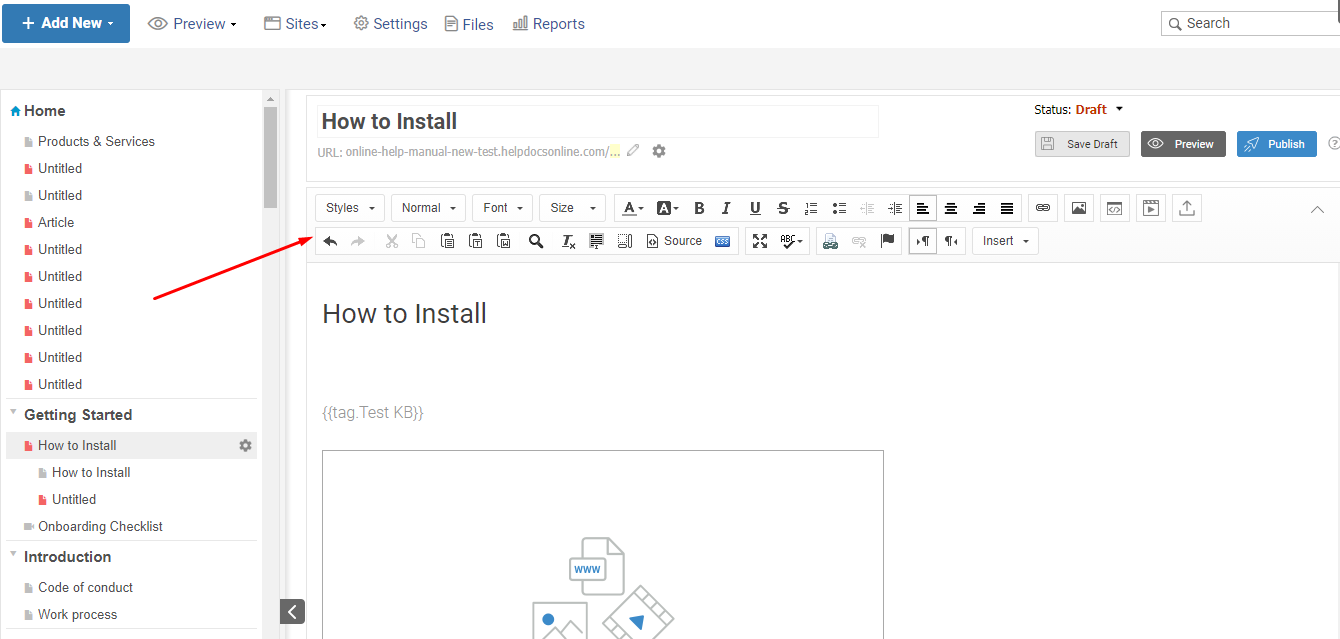
A customer portal software should offer easy authoring options. An MS Word-like editor works best when it comes to writing, editing, and uploading content.
You should also be able to import word docs, PDF files, PowerPoint, and Excel files to the portal. This is a good feature that expedites content creation without you having to write everything from scratch.
2. Complete Branding & Customization
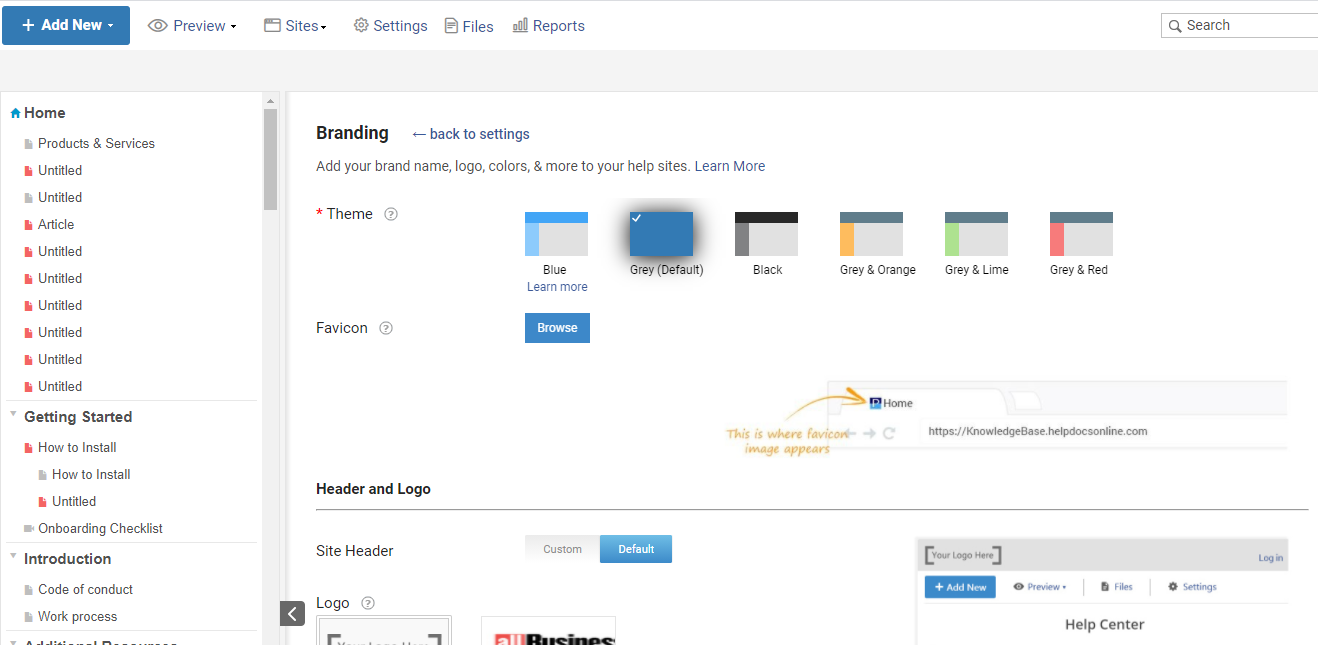
A customer portal software should enable end-to-end customization of the platform. From adding your company’s logo and brand name to changing the layout, fonts, and themes, the software should help you do it all.
If it offers CSS, it would be a cherry on top. CSS allows full customization from the backend, where you can exercise complete control over the portal’s layout and format.
3. Lightening-Fast Search
Any online platform is powerless without a powerful search system. The customer portal software should offer a speedy search system that works as effectively as Google’s. This means it should deliver relevant results as soon as someone starts writing a question, keyword, or phrase in the search bar.
Here’s an example of a highly searchable search system.
4. Options for Search Engine Optimization
 4. Options for Search Engine Optimization
A customer portal should easily be found online, with minimum effort. That can happen only when it is optimized for search engines.
The customer portal software you choose should offer search engine support for popular platforms like Google, Bing, and Yahoo. It should help you get your portal indexed organically on search engines so that customers can find it in the top few search results.
An SEO-ready portal heightens online visibility, drives traffic to your website, and improves its ranking on the web.
5. Foolproof Security System
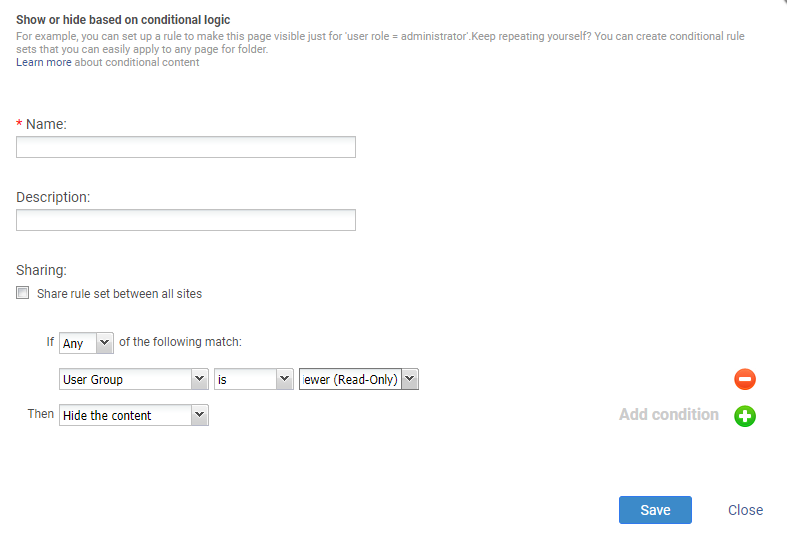
A customer portal can have sensitive information meant only for your agents. You might not want to display this content publicly. It can be related articles related to your internal support process, confidential information about your offerings, pricing of specific products, etc.
A powerful customer portal software safeguards such sensitive content from any potential misuse. Besides setting page or folder level restrictions, you can also set conditions to hide or display specific content from specific users or groups.
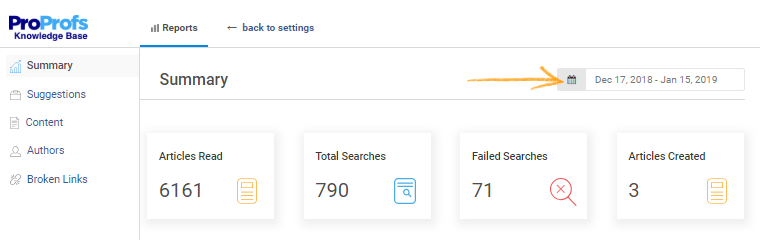
6. AI-Powered Reports
The hardest part of customer support is to decode what your customers really want. A customer portal software solves this problem with its AI-powered reports. These insightful reports give a peek into:
- The total number of searches made
- Keywords that failed to return results
- Knowledge base article upvotes and downvotes
- Inactive and broken links along with their page titles and much more.
Tracking these powerful metrics can bring meaningful changes to your support portal, ensuring that it stays updated and relevant for customers.
7. Feedback, Surveys, & Ticket Forms
It’s important for a customer portal to have feedback questions, survey forms, and ticket forms to give customers a holistic experience.
When customers visit the portal, they expect self-service, feedback options, and the option to submit a ticket if they don’t find what they are looking for.
Feedback forms and web surveys give you access to customer pain points and any suggestions they might have to improve the portal.
For example, after every article, you can add a feedback form asking customers – “Did you find this article helpful?” with yes and no as the options. In case customers select No, they will be shown possible reasons that led to a bad experience and a comment box where they can explain the issue.
A customer portal software should help you provide a seamless and friction-free experience to customers so that they don’t have to go from pillar to post to get what they need.
This short video will guide you through how surveys and forms work.
Essential Elements of a Stunning Customer Portal
Search online, and you will find scores of customer portals. Are they all effective? Not necessarily.
It’s not that hard to find a portal that lacks necessary features like structure, search, and many more. But, it’s a pain to find something that is truly the epitome of excellence.
While creating a support portal, remember that anything average is not going to bring miraculous results. For the platform to weave its magic on customers, it has to be a lot more than ordinary.
Below are some of the essential elements that can turn your self-service portal from average to exceptional.
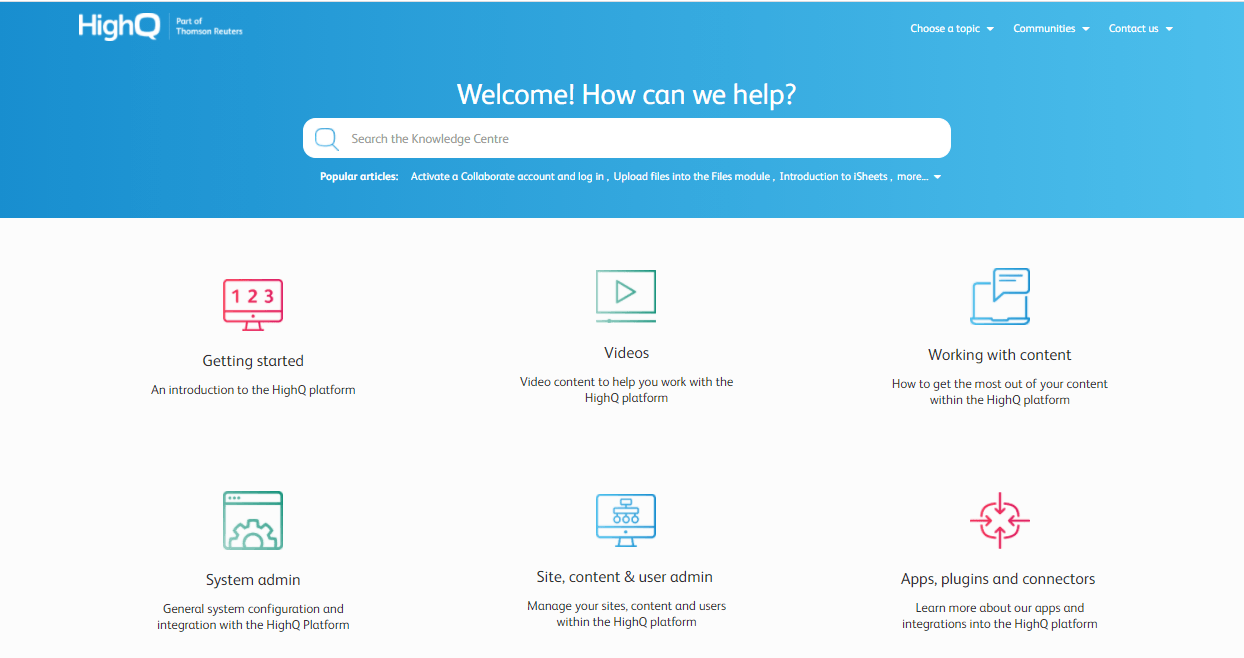
1. Effectively Structured & Designed
Structure and design are two elements that can take your customer support portal to the next level. While structure ensures that information is presented properly, the design brings life to the portal with colors, fonts, and themes.
Quality content is undoubtedly crucial for a support platform. But, the way it is presented is equally important. A well-structured and designed portal has :
- A home page and a table of contents with various sections and subsections
- Information presented in short paragraphs and bullet points
- Images, videos, and screenshots to support the content wherever necessary
- Your company’s name and logo
- Fonts, themes, and colors that are in tune with your brand
HighQ’s customer help site, powered by ProProfs, has the perfect design and structure. Have a look.
2. Content Segmentation
Customers are at different stages in their journeys and have different requirements. While some are just beginning to use your product, others have turned into experts. Some need basic information, while others require product-specific data.
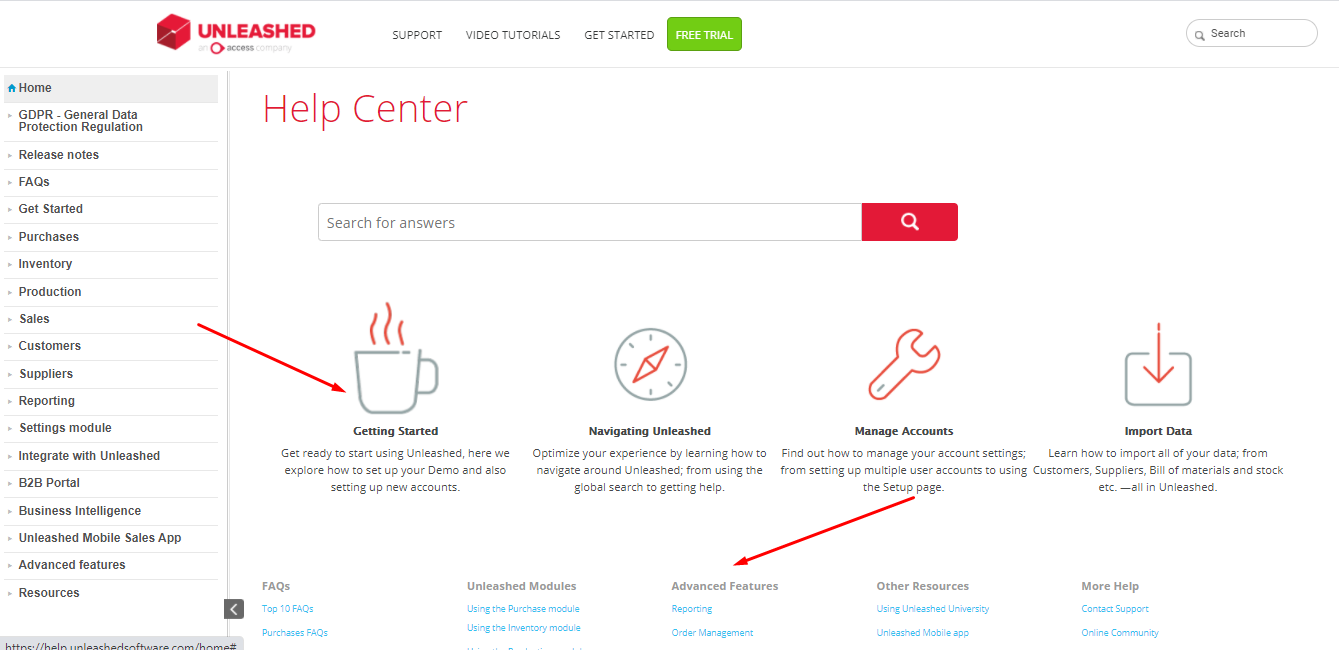
You need to recognize these differences and accordingly segment the information. An ideal customer portal caters to customers at all stages by presenting them with the most valuable and relevant information.
The information is segmented by product line, geographic location, customer stages, and other such elements. This means new customers will have getting started videos and how-to guides to get familiar with the concepts, and experienced customers will have access to advanced information.
Unleashed’s help center, powered by ProProfs, has done a great job at content segmentation.
3. Exclusive Information That Cannot Be Found Elsewhere
A customer portal is not any regular information source. It’s a thriving, knowledge-bursting portal where customers can access relevant information, trusted tips, and a vast community of fellow customers.
It acts as a center of all company communication, providing customers with regular updates, news, and other critical information. From comprehensive guides to detailed videos and FAQs, the portal covers it all.
If the portal has the data that’s already available on your website or blogs, it will not be valuable for customers. Its use will slowly decline with customers switching to regular information sources.
A perfect support portal is full of reliable, exclusive information to achieve ultimate customer success.
4. A Community Forum to Ask & Answer Questions
A self-service knowledge base can comprise limitless information. You can add all product details, company news, and troubleshooting tips for general customer issues.
What if your customers encounter an issue that is not mentioned in the existing articles? Is call, email, or ticket submission the next step?
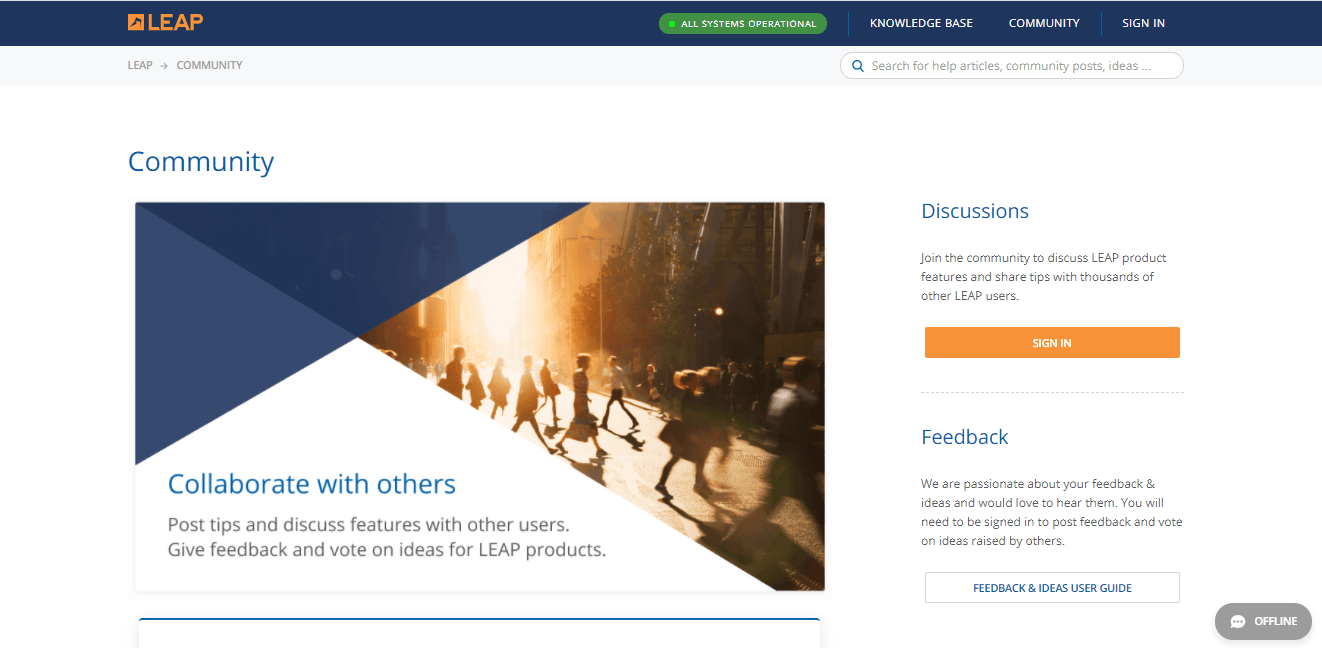
Not really. An effective customer portal comes with a community forum where customers can ask questions and get answers from people who are in the same boat, experiencing the same issues.
A peer-to-peer community exponentially grows the portal’s value by making it a rich resource that never fails to delight customers. This is a great way for customers to solve problems together and develop meaningful relationships with one another and with your brand.
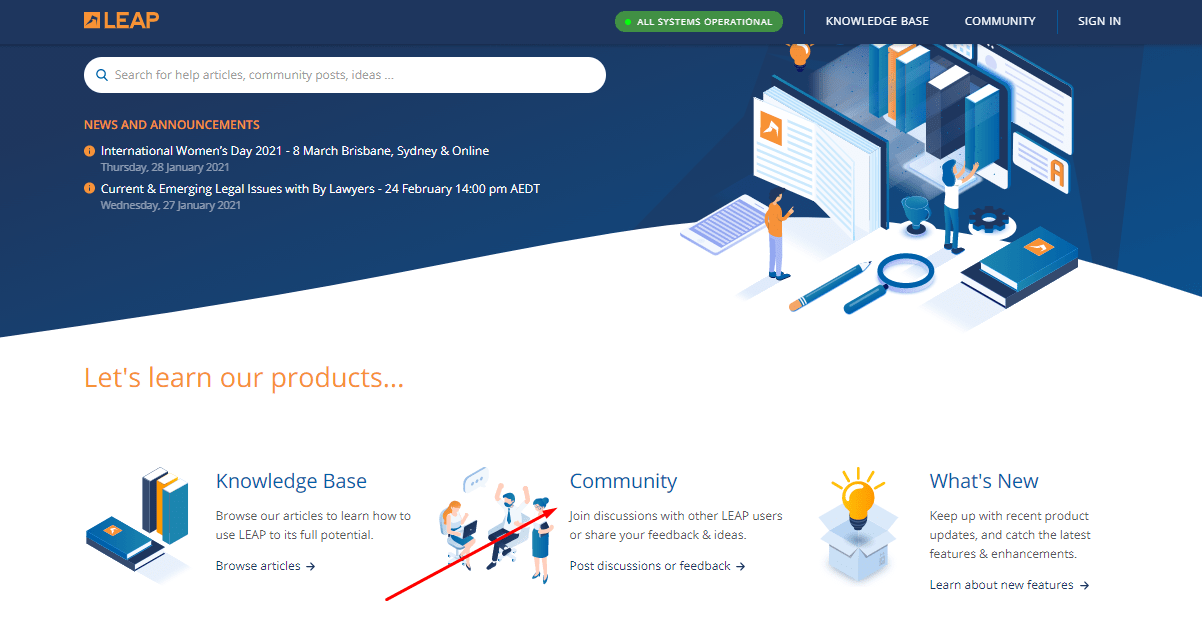
LEAP is a striking example of a community where its customers can partake in discussions within the walls of its customer support portal.
5. Uninterrupted Search & Navigation
 5. Uninterrupted Search & Navigation
Is a customer portal really useful if customers can’t search or navigate through the content seamlessly?
Search and navigation are the two elements that decide whether customers will continue browsing the portal or leave in the first instance. Since this portal is a knowledge center, a seamless search and navigation system is crucial.
Your portal might have golden nuggets of advice that customers need and critical information to troubleshoot issues. But, all of it is futile if search and navigation are a challenge.
As discussed above, the search is an essential feature of customer portal software. It should deliver accurate responses, even before the keyword or question is typed. You need to use the right tags and keywords for content to be searchable.
For effective navigation, there should be enough internal linking in the platform. Articles should be linked to one another, leading customers from one place to another almost immediately.
Build Lasting Satisfaction & Strong Relationships With Customer Portal Software
Today’s customers want empowerment, not compromise.
They want convenience, no hassles.
They need lasting satisfaction, not temporary happiness.
A customer portal software is a key to unlock customer happiness. It helps you build an information-packed support platform to achieve ultimate customer success.
While it allows customers to help themselves and reduces support tickets, it also takes the pressure off your agents and helps them fully focus on pressing customer concerns. It also helps you build strong relationships with customers that last a lifetime.
Create an online customer portal with ProProfs Knowledge Base software and strengthen your bonds with customers.
Do you want a free Knowledge Base?
We have the #1 Online Knowledge Base Software for instant self-help