

Welcoming new customers to your business is more than just a formality – it’s a crucial opportunity to set the stage for a long-lasting and mutually beneficial relationship.
Imagine this process as the warm handshake that initiates a partnership. This handshake is none other than the customer onboarding process – a carefully orchestrated series of steps that transforms first-time buyers into loyal advocates.
In this comprehensive guide, we will delve into the depths of customer onboarding, exploring its significance, benefits, strategies, best practices, and real-world examples.
By the end, you’ll be armed with the knowledge to create a customer onboarding experience that not only impresses but also transforms your business relationships.
What Is Customer Onboarding?
Customer onboarding is the art of seamlessly integrating new customers into your business ecosystem. Think of it as rolling out the red carpet for your clients – ensuring they feel valued, understood, and empowered from the very beginning.
Let’s consider an example: Jane, a tech-savvy entrepreneur, recently subscribed to a cloud-based project management tool. Upon signing up, she receives a personalized welcome email, a guided tour of the platform’s features, and access to a library of video tutorials.
This meticulous attention to detail not only helps Jane get started quickly but also cements her confidence in the tool’s value.
Benefits of Effective Customer Onboarding
Creating an effective customer onboarding process isn’t just about checking off boxes; it’s about laying a strong foundation for a lasting partnership.
By investing your time and effort into crafting a seamless onboarding experience, you can reap a multitude of benefits that extend far beyond the initial transaction.
Here are five compelling reasons why effective customer onboarding can be a game changer for your business:
Enhanced Product Understanding
A well-structured onboarding process ensures that customers fully grasp the intricacies and capabilities of your products or services. When customers comprehend how to leverage all product features, they can extract maximum value from it.
For instance, consider graphic design software. Through an onboarding journey that encompasses detailed tutorials and interactive guides, users learn not only the basics but also discover advanced tools that empower them to create stunning designs.
This comprehensive understanding not only boosts user satisfaction but also encourages exploration and innovation.
Reduced Time-to-Value
An effective onboarding process accelerates the time it takes for customers to start deriving tangible value from your product or service.
By swiftly guiding users through essential features and functionalities, you help them overcome the initial learning curve and achieve their desired outcomes sooner.
This immediate value realization instills a sense of accomplishment, reinforcing their decision to choose your solution.
For example, in the case of a project management tool, a well-structured onboarding process can swiftly introduce users to creating projects, assigning tasks, and collaborating with team members, allowing them to start managing projects efficiently right away.
Lower Churn Rates
The battle against customer churn begins the moment a purchase is made.
An effective onboarding experience significantly reduces the chances of customers abandoning the ship shortly after signing up. When customers feel guided and supported during their early interactions with your product, they’re less likely to become frustrated or overwhelmed.
This, in turn, translates to increased customer satisfaction and a higher likelihood of continued usage.
Imagine an e-commerce platform that offers personalized onboarding assistance, helping customers find and purchase their first products with ease. This level of care and attention can form the cornerstone of a long-lasting relationship.
Increased Cross-Selling and Upselling Opportunities
Effective onboarding is a golden opportunity to introduce customers to additional offerings that complement their initial purchase.
By showcasing the breadth of your product ecosystem and how various components work together seamlessly, you open the door to cross-selling and upselling.
For instance, consider a software suite that provides modules for accounting, project management, and customer relationship management.
During onboarding, customers are exposed to the seamless integration of these modules, making them more likely to explore and invest in other components that enhance their overall business operations.
Positive Word-of-Mouth and Advocacy
Satisfied and onboarded customers are more inclined to share their positive experiences with peers, colleagues, and industry networks. Their advocacy serves as a potent form of word-of-mouth marketing, generating valuable referrals and attracting new customers.
For instance, think of a subscription-based fitness app that not only guides users through personalized workout plans but also offers nutritional guidance during onboarding.
Users who experience significant progress and benefits are more likely to recommend the app to friends and family, contributing to its organic growth.
In essence, effective customer onboarding isn’t just a preliminary process – it’s a strategic investment that pays dividends in the form of empowered customers, increased loyalty, and sustainable business growth.
How to Create a Powerful Customer Onboarding Strategy
Creating a robust customer onboarding strategy revolves around personalized engagement, clear direction, and ongoing improvement.
Follow these simple steps to create a powerful strategy for customer onboarding.
1. Set Specific Goals
Without a clear goal, there is a high chance of your onboarding process going off track. When you focus on something, you know the steps that will take you there. You can plan things accordingly, which further increases the likelihood of success.
It helps you channel your efforts in the right direction and achieve maximum success.
While setting goals, ensure that they are SMART:
S – Specific
M – Measurable
A – Achievable
R – Relevant
T – Time-bound
Stick to this criteria as it will make both achieving goals and measuring results easier for you. Work on your onboarding goals and delight customers with “aha!” moments early in their journey.
2. Get the Right Team on Board
For successful customer onboarding, it’s important to assign the task to the right team. A single person can handle onboarding if yours is a small business. However, you will need a full-fledged team if you are a business dealing in complex products.
Customer onboarding has various components. Some of them are:
- Designing the content
- Deciding the channels of support
- Conducting training sessions
- Managing relationships with customers
- Adopting the right support tools
Your customer success team must have complete clarity on your goals and the process to achieve them. While adding members to the team, ensure that they are:
- Experienced in handling customers
- Comfortable using support tools
- Proficient in client communication
- Well-versed with the basics of onboarding
A team with the right skills and knowledge is better positioned to onboard customers and leave a lasting impression.
3. Determine the Onboarding Process
How do you want onboarding to occur – through self-service, product walkthroughs, emails, or a high-touch model where dedicated agents onboard customers?
The onboarding process depends on how you want things to take shape and the level of involvement you want from the support team.
For example, the self-service model is designed for no-touch onboarding.
Customers can self-learn at their convenience and progress at the pace they want.
This model works great for B2C companies having a large number of customers. It is also a good option if you don’t want to spend a lot on onboarding.
On the other hand, low-touch models like email and chat support are good for products that are a bit complex in nature but not to the level that requires in-person support.
If you want to provide extremely personalized onboarding, a high-touch model where customer support or success agents intervene and provide solutions tailored to customers’ needs is recommended.
4. Measure the Success
Once the process ends, create a system that helps you measure the success of your onboarding.
You can track customer onboarding metrics like:
- The amount of time customers took to fully onboard
- The product features and functions that caused frustration
- Rate of product or service upgrades
- Level of customer engagement. Find whether customers are taking the defined actions and routes to achieve success with your products.
- Customer churn rate
- NPS scores. These are perfect for gauging customer loyalty towards your brand.
Tap into this data to measure the onboarding’s impact and accordingly refine the process for superior results.
5. Stay in Touch With Customers
Onboarding is not just limited to 30, 60, or 90 days. It’s an ongoing process that requires constant communication. Customers should get the support they need even long after formal onboarding has been completed.
Eventually, onboarding is all about educating customers and supporting them every step of the way, from the first interaction to subsequent ones.
Approach them for feedback and learn about their pain points. Share surveys to determine what’s bothering them and let them know that they matter to you now as much as when you first acquired them.
The Customer Onboarding Process
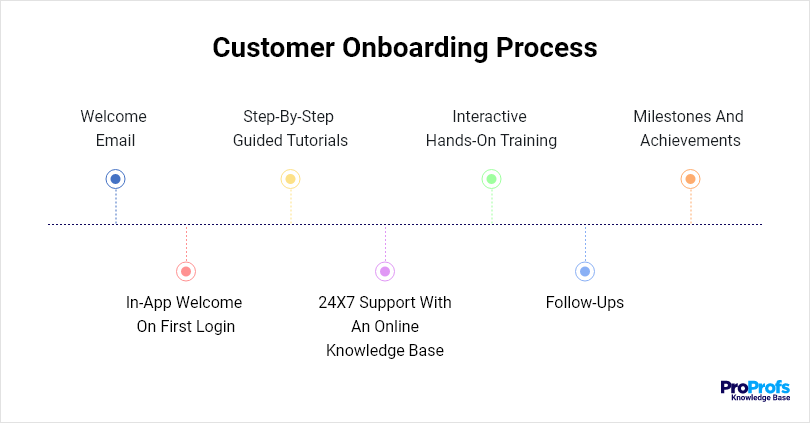
Now that we’ve laid the foundation for a compelling customer onboarding strategy, let’s delve into the nitty-gritty of the onboarding process itself.
Think of this process as a series of purposeful actions that guide your customers from initial interaction to full-fledged engagement.
Let’s explore the key steps for creating a seamless customer onboarding process:
Extend a Warm Welcome Through Email
Your customer’s journey begins with a personalized welcome email that does more than acknowledge their sign-up – it makes them feel like a valued part of your community.
Craft a warm message expressing appreciation for their decision and briefly outline the value they can expect.
Include a personalized video or message from your CEO to provide a personal touch.
For instance, an e-commerce platform could share a video highlighting exclusive offers or a quick-start guide to help customers navigate their first purchases.
Here is a sample personalized welcome email below:
| Hi, George, Congratulations on joining our customer list! Welcome to CustomMade.We are thrilled to have you onboard and are excited to help you achieve your goals. We are eager to help you create your first email marketing campaign. Sign in, pick your preferred email template, and start sending emails today! If you need help, don’t worry. We are here to walk you through every step. [Sign In Now] Joy, Customer Support Representative, CustomMade |
Provide In-App Welcome on First Login
First impressions matter, and a well-designed in-app welcome sets the tone for user experience.
As customers log in for the first time, greet them with an unobtrusive but informative welcome message. Use this opportunity to highlight key features, demonstrate how to access support, and guide users to their next steps.
A project management software might greet new users with a guided tour of the dashboard, showcasing how to create projects, assign tasks, and collaborate with team members.
Create Step-by-Step Guided Tutorials
Empower your customers with comprehensive step-by-step guide tutorials that cater to different user levels.
These tutorials should cover essential tasks and use cases, allowing users to progress at their own pace.
Include visuals, annotations, and interactive elements to enhance understanding. For example, a social media scheduling tool might provide tutorials on how to schedule posts, analyze engagement metrics, and optimize content for different platforms.
Provide 24×7 Support with an Online Knowledge Base
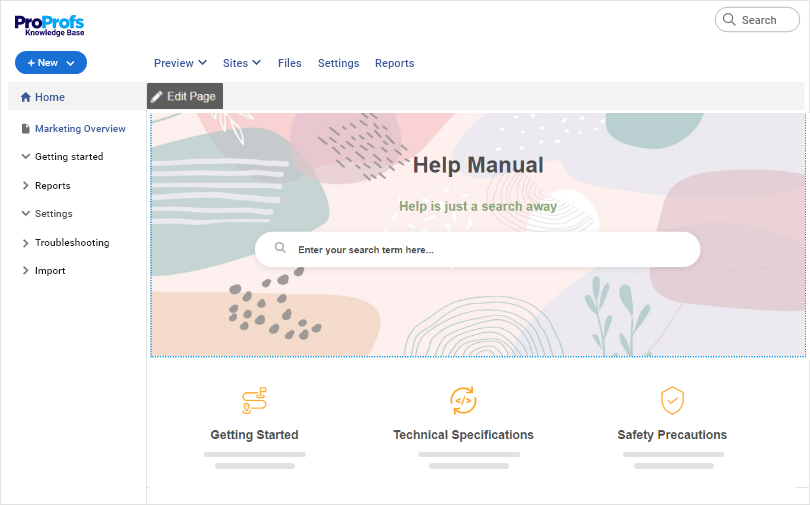
The key to self-sufficiency is easy access to information.
Create a knowledge base that acts as a go-to resource for users seeking assistance.
Populate it with a diverse range of articles, FAQs, video guides, and troubleshooting solutions. Categorize content for easy navigation, ensuring users can quickly find answers to their questions.
It enhances their self-reliance and fosters a sense of autonomy, ultimately reducing the need for constant assistance and expediting their journey toward becoming proficient users.
When creating a knowledge base, using the right tool is important.
For example, ProProfs Knowledge Base is one such powerful software that has all the necessary features for editing, designing, and publishing, making the content creation process a breeze.
Here’s a quick video to guide you on how to create a compelling knowledge base for your customers.
Offer Interactive Hands-On Training
Elevate the onboarding experience by hosting interactive, hands-on training sessions or webinars.
These real-time interactions provide a platform for users to engage directly with your product and experts. Use these sessions to showcase advanced features, address common challenges, and respond to live questions.
For instance, a graphic design software might conduct a webinar demonstrating how to create intricate designs using layering techniques and custom brushes.
Conduct Regular Check-ins for Follow-Up
Building a strong rapport requires ongoing communication.
Initiate regular check-ins at critical points in the onboarding process to ensure customers are on the right track. These check-ins provide an opportunity to address concerns, gather feedback, and offer additional guidance.
Use a personalized approach, reaching out via email or a brief phone call to understand their experience.
For example, a financial advisory firm could schedule follow-up calls after clients have set up their investment portfolios, addressing any questions and reinforcing their financial goals.
Acknowledge Milestones and Achievements
Celebrate your customers’ achievements by recognizing their progress within your product or service. Send personalized messages or badges when users reach significant milestones.
This recognition not only boosts their motivation but also fosters a sense of accomplishment and camaraderie with your brand.
An online learning platform could award certificates or badges when learners complete specific courses or achieve mastery in a subject.
By meticulously executing each of these steps, you create an onboarding process that is not just a checklist, but a personalized and enriching experience.
This comprehensive approach fosters understanding, encourages active engagement, and instills confidence, ultimately forming the bedrock of a strong and enduring customer relationship.
Best Customer Onboarding Practices
Now that we’ve explored the core components of an effective customer onboarding process, let’s explore the best practices that can elevate this process from good to exceptional.
By incorporating these best practices, you’ll set the stage for a transformative onboarding experience that resonates with your audience and solidifies your relationship.
1. Understand Your Customers to the Core
Create buyer personas and get a complete grasp of your target audience. Learn about their preferences, purchase or subscription history, buying behavior, past issues, and more to gain a holistic understanding of your customers.
Find out a few basic things about them:
- What are they looking for?
- The problems they are experiencing
- The risks they are facing
- Reasons behind churning, and more.
Get a hold of this critical data and tailor the customer onboarding experience.
2. Set the Right Expectations
You don’t want customers to expect something that you cannot deliver. Being practical and reasonable is recommended as it ensures that customers are not disappointed when lofty or unreal expectations are not met.
Customers create expectations even before they purchase from you. When these expectations are not met, they leave in disappointment. Avoid such situations by setting the right expectations from the very beginning.
Your marketing campaigns have conveyed the value your product provides but once customers come on board, reiterate that value so that they know what to expect.
Convey the bottlenecks they might face and the best ways to resolve them. Also, explain how your team will be supporting them when issues go out of control.
3. Gather Customer Data
Gathering critical customer data is an integral part of the onboarding process because, with such information, you are able to measure success.
The process of collecting customer data should kick off immediately once the welcome email has been sent.
There are several methods that you can use to gather customer data. These include online surveys and inbuilt tools and technology. When using surveys, ensure that they capture meaningful information required to engage customers in the next stages.
Modern survey tools help you create and launch customer satisfaction surveys, scored and in-app surveys, polls, and others. Collecting and analyzing feedback is a breeze with such tools.
Learn how you can create beautiful surveys with ProProfs Survey Maker in this video.
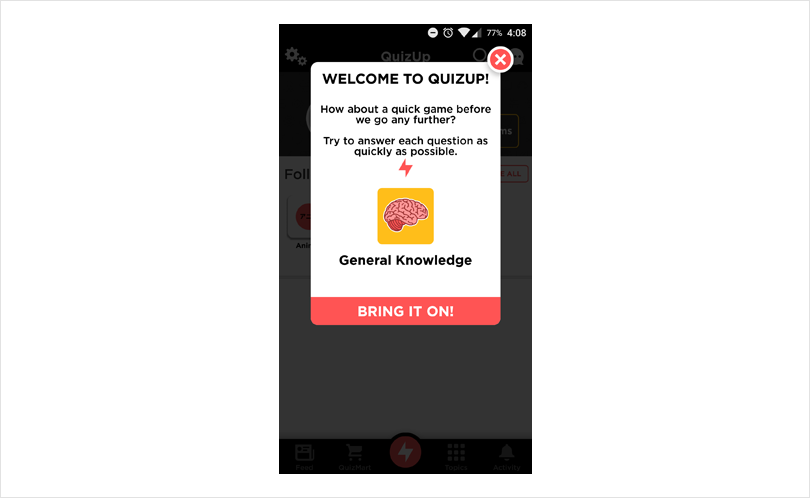
4. Greet Customers With In-App Messages
Greet customers using in-app messages when they first log in to their account or start using your product. Guide them on the initial few steps and help them proceed with confidence. To effectively nurture new customers, it is advisable that you only ask customers to do one thing at a time.
For an impactful in-app greeting, try to add a video to the message. It makes things much easier for your new customers, helping them get familiar with your brand and products in less time.
Stylehive has done a great job at it. Its super simple in-app message is a hit among its customers. It helps buyers find discounts, coupons and guides them on how various other things.
5. Create Product Tutorials
Tutorials are a tremendous source of learning for new employees. They instruct new customers on how to use your products and realize the results they desire.
For instance, a business that sells software products can create a tutorial to guide users through the set-up or installation process.
In the same way, a company that sells equipment can create tutorials showing customers how to set up the equipment. Product tutorials should outline the step-by-step process in a precise manner. They should be brief and easy to understand.
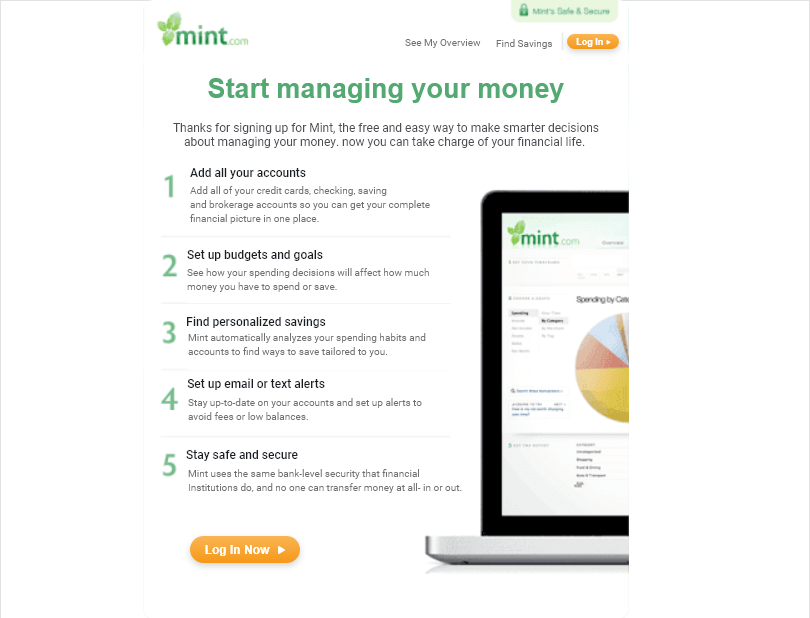
Mint is one of the companies that has nailed the art of creating product tutorials. Its money management application has developed a step-by-step process that enables new customers to sign up and start managing their money with ease.
Look at its product tutorial process for new customers below:
6. Create Interactive Product Walk-Throughs
An essential aspect of the customer onboarding process is to help new customers learn how to use your product and derive real value from it. What can be a better way to do this than let customers learn to use the product on their own.
Interactive walkthroughs appear as customers complete one task and proceed further. They show them how to accomplish the next step. These walkthroughs will have contextual help in the form of tips, directing users in the right direction.
Walkthroughs are great if you want customers to learn by doing.
Customer Onboarding Checklist – Welcome New Customers With Confidence
As you acquire more customers, you will have to onboard them too. Creating a customer onboarding process can be cumbersome, and some things might slip through the cracks.
This checklist highlights the top few things you should keep in mind to give your customers a warm and welcoming experience.
- Create automated email triggers to welcome customers
- Share follow-up emails to check up on your new customers
- Build a self-service portal for seamless onboarding
- Employe tools like live chat and help desk to deliver a 360-degree support experience
- Use a generous number of videos in all the support solutions you provide
- Make the onboarding process skippable. Some of your new customers might have used a similar product in the past.
- Deliver 24×7 support
- Share surveys to capture customer feedback and improve the onboarding experience
It’s finally time to see customer onboarding in action.
Top 5 Customer Onboarding Examples
Let’s look at the five brands that are nailing customer onboarding, giving their patrons a one-of-a-kind experience.
1. Netflix
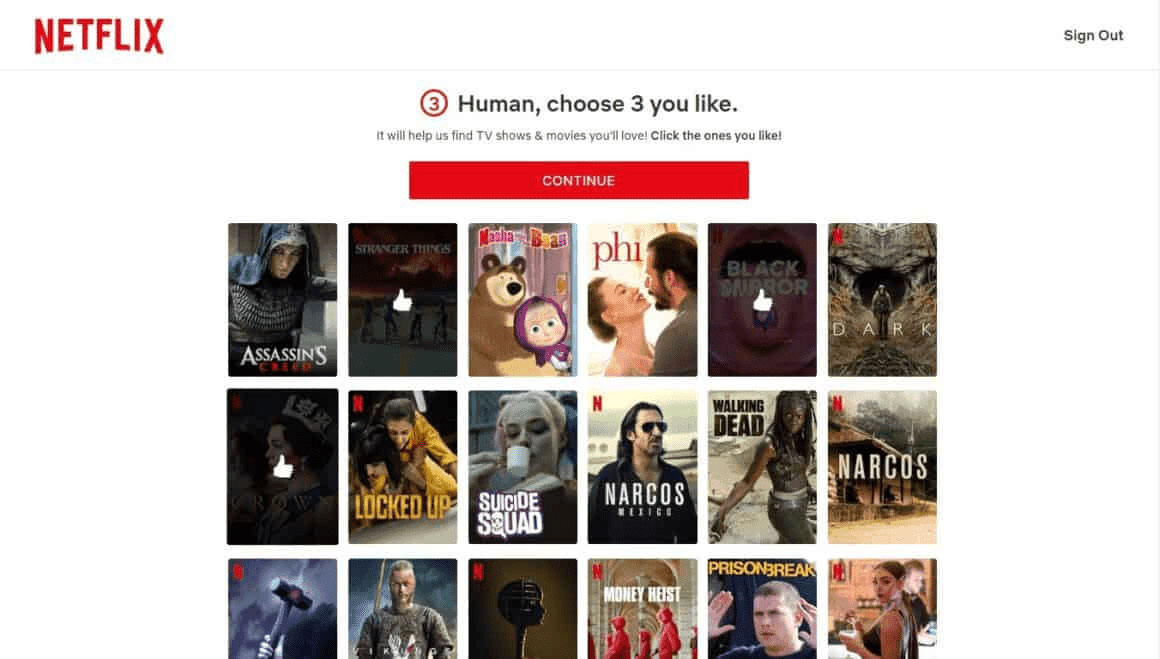
Netflix users need little instruction on how to navigate the platform and get what they need. The OTT platform is already user-friendly. On top of that, its seamless onboarding makes the customer experience unbeatable.
Strong CTAs and a complete walkthrough of how to set up an account and make the most of Netflix provide users heightened convenience. Users can also personalize what they want to see, and once their home page is set, they don’t need guidance anymore since the portal is extremely simple to use.
Source: Netflix
2. Slack
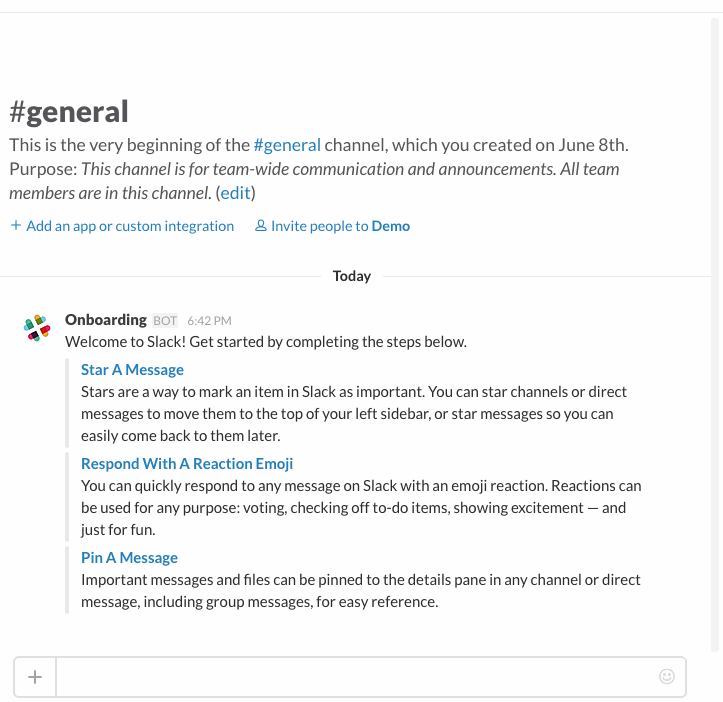
Slack takes the ‘learn by doing’ approach when it comes to customer onboarding. On signing up to Slack, the Slack bot shows new users the steps they should take to use the platform. The process is such that users can learn and execute the steps simultaneously.
Source: Slack
3. Canva
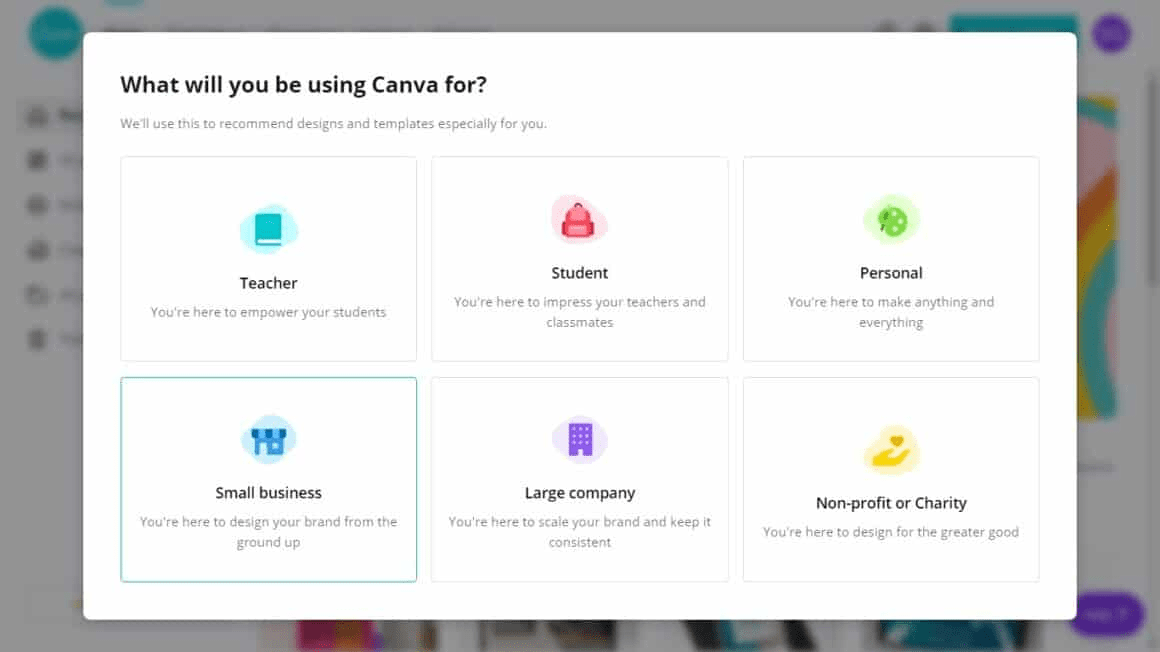
Think personalized onboarding, and Canva takes the first spot. It first asks its users how they want to use the platform and then directs them to a tutorial that teaches them exactly what they want to do. This gives its users a personalized onboarding experience that’s tailored to their goals.
Source: Canva
4. Zapier
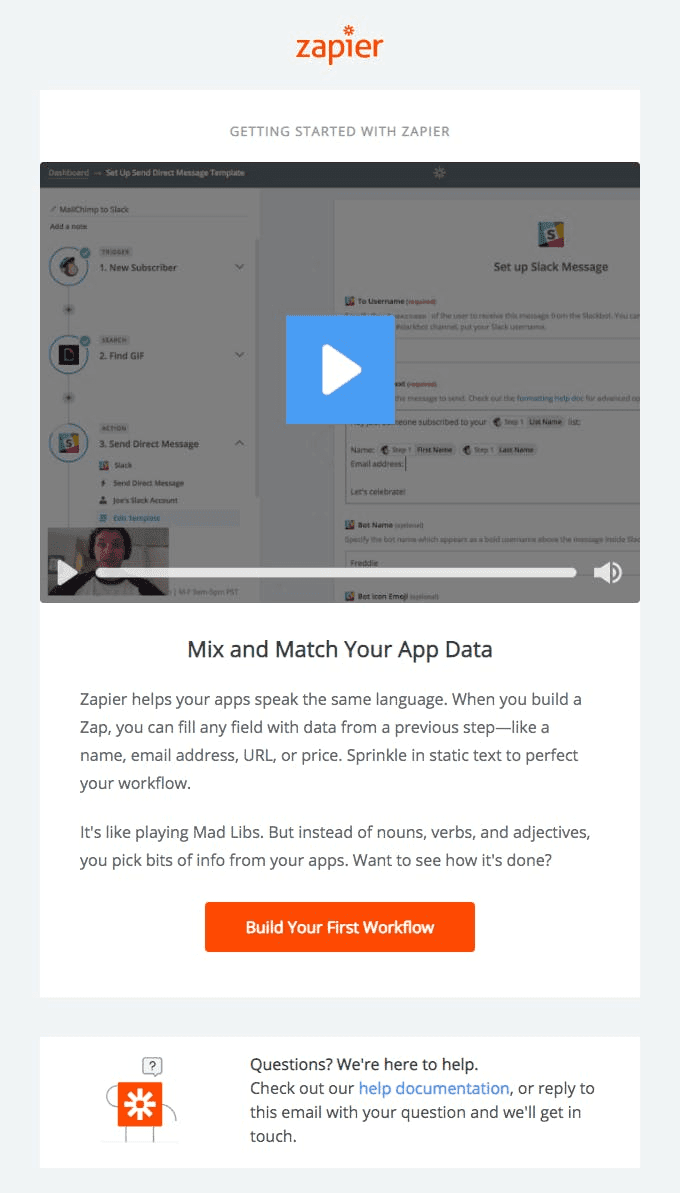
Zapier is known for its customer-first approach. Its onboarding process is quite comprehensive, including regular follow-up emails, help documentation, CTAs, videos, and much more. The all-in-one system of giving customers everything they need proves immensely helpful in onboarding.
Source: Zapier
5. Pinterest
Pinterest is one of the best user onboarding examples. As soon as new users sign up, they are shown a range of categories to choose from. Once they select their favorite topics, Pinterest shows them targeted content based on their interests. Besides, Pinterest encourages its users to try its other features like – saving a pin for later and getting its mobile application.
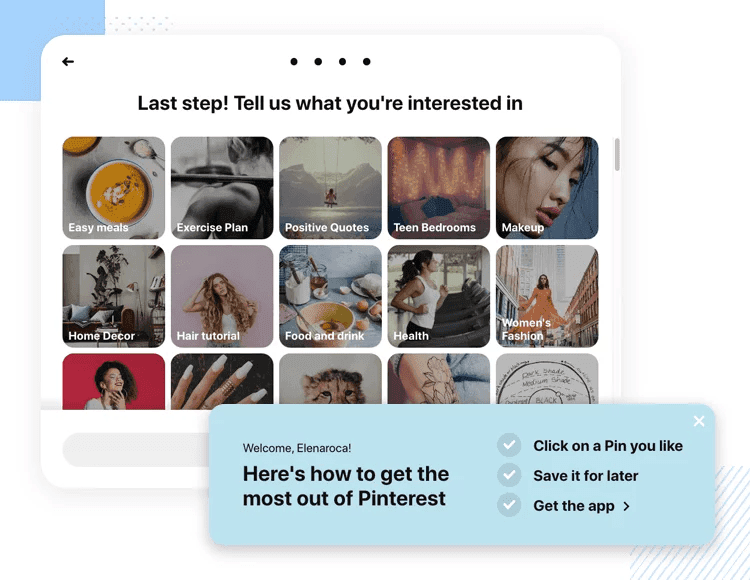
Source: Pinterest
Pave the Path to Lasting Success With Seamless Customer Onboarding
Customer onboarding isn’t just a checkbox on your to-do list; it’s the secret sauce that transforms casual buyers into lifelong advocates.
By implementing a thoughtful onboarding strategy, you not only provide value from day one but also foster lasting relationships built on trust and understanding.
Remember, customer onboarding isn’t a one-size-fits-all endeavor – it’s a dynamic process that adapts to your customers’ unique needs and evolves as your business does. So, go ahead and craft an onboarding experience that leaves an indelible mark – your customers will thank you, and your business will thrive.
With this guide as your compass, you’re ready to embark on a journey toward unparalleled customer onboarding excellence.
FREE. All Features. FOREVER!
Try our Forever FREE account with all premium features!