AI Knowledge Base Software That Resolves 80% Tickets Automatically smiley

AI writes, translates, and improves your knowledge base. Customers get instant answers, your team stays in control.
Get Started Free

tick Created with Sketch. No credit card required.

FREE. All Features. FOREVER!

Try our Forever FREE plan with all the premium features for growing businesses

Help Sites. Customer Manuals. Internal Knowledge Base. One Tool.

All your knowledge use cases, organized your way in one tool.
Built by Real Teams

See what customers built with ProProfs.

From enterprise help centers to internal wikis. Fully branded, fully searchable, live in days.
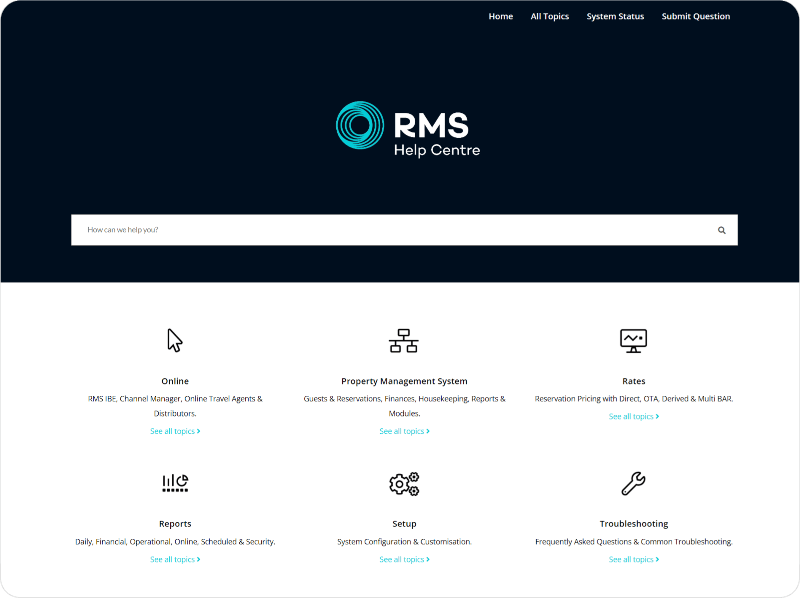
RMS Helpcenter
Riscure
Zoho
IDS
Gateway Mission
CDS Convert
Create a Knowledge Base with Free Templates

Never Answer the Same Question Again

Your customers get the answer before they open a ticket. Your team stops fielding the same questions on repeat.

The AI search on your help site understands plain language questions, not just keywords. It pulls the right answer instantly, filters across your entire knowledge base, and connects directly to Live Chat so your chatbot handles the repeat questions automatically while your agents focus on the ones that actually need a human.

  • tick Knowledgebase tick
    Answers via AI knowledge, not keywords

    Customers ask in plain language. The AI returns the right answer, not a list of articles to sift through.

  • tick Knowledgebase tick
    One search across all your knowledge bases

    Multiple help centers, one search. Every article surfaced from a single query.

  • tick Knowledgebase tick
    Chatbot handles repeat questions

    The bot answers the same three questions your team fields every day. No escalation needed.

Never Answer
ProProfs Support Suite

One AI Brain. Every Touchpoint Answered.

Knowledge Base, Live Chat, Help Desk, and Surveys unified in one suite, under one login.

  • tick Knowledgebase tick Live Chat pulls answers straight from your knowledge base
  • tick Knowledgebase tick Help Desk auto-suggests articles before a ticket is even raised
  • tick Knowledgebase tick Surveys track feedback, fix gaps, and improve CSAT
  • tick Knowledgebase tick Knowledge Base gets smarter from chats and tickets
Built for Every Team

Works for every use case.

One platform that serves your customers, agents, new hires, and search engines all at once.
Allow Public or Private Access

A modern knowledge base platform helps you create both public and private knowledge bases, depending on your target audience. You can keep the knowledge base public for customer self-service or allow access to only internal employees using passwords and privacy controls.

  • tick Knowledgebase tick Keep your knowledge base public or private
  • tick Knowledgebase tick Enable single sign-on for authorized access
  • tick Knowledgebase tick Control knowledge base visibility
Allows Public or Private Access
Delight Customers With Instant 24x7 Self-Help

Ditch the frustration of long wait times and endless phone menus. Offer instant, 24/7 support through a self-service knowledge base. Empower customers to find answers on their own time, reducing reliance on your support team for common issues.

  • tick Knowledgebase tick Provide round-the-clock self-help
  • tick Knowledgebase tick Make customers independent
  • tick Knowledgebase tick Reduce dependence on calls and emails
Help Agents Improve Customer Support

Agents need information at their fingertips to be able to answer customer questions right when they arise. With a simple knowledge base platform, your customer support staff will always have access to the most updated information. They can leverage that knowledge to cater to customer requests, make informed decisions, and deliver delightful customer support experiences.

  • tick Knowledgebase tick Help agents resolve issues confidently
  • tick Knowledgebase tick Provide agents 24x7 access to information
  • tick Knowledgebase tick Reduce issue resolution time
Help Agents Improve Customer Support
Boost Team Collaboration

Assign clear roles and permissions so everyone's on the same page. Plus, built-in commenting lets you share ideas and discuss projects directly within the platform.

  • tick Knowledgebase tick Assign roles & permissions
  • tick Knowledgebase tick Collaborate to build & share knowledge
  • tick Knowledgebase tick Provide feedback via internal comments
Improve Employee Onboarding

New employees need constant support to get familiar with an organization and meet work expectations. An online knowledge base brings them up to speed with your company’s culture and work dynamics. It provides new hires with centralized access to critical information related to your products and services, company policies, employee data, work processes, and much more. This allows them to learn conveniently at their own pace and become self-reliant right from day one.

  • tick Knowledgebase tick Bring employees up to speed quickly
  • tick Knowledgebase tick Make learning easy & convenient
  • tick Knowledgebase tick Provide a seamless onboarding experience
Improves Employee Onboarding
Improve Search Engine Ranking of Your Knowledge Base

If you opt to make a public knowledge base (we also support private & secure knowledge base), you can make it SEO-friendly with a single click and get additional customers, leads & traffic. We've designed ProProfs such that when SEO settings are enabled it shows up on top of search engines, driving more visibility to your brand. Experience the industry's most powerful SEO capabilities in a knowledge base.

  • tick Knowledgebase tick Make discovery easy
  • tick Knowledgebase tick Get top search rankings & reach
  • tick Knowledgebase tick Increate traffic & visibility

100+ Settings & Integrations

Connect ProProfs Knowledge Base seamlessly with your favorite tools

Design beautiful knowledge bases using branding features and pre-made templates, or customize fully with CSS and HTML. Configure 100+ settings for common tasks like single sign-on, security and more. Integrate with popular tools such as Google Analytics, Wufoo and more.

  • tick Knowledgebase tick Branding, Templates, CSS
  • tick Knowledgebase tick Configure 100+ settings
  • tick Knowledgebase tick Integration with CRMs, help desks, chat & popular tools

Try ProProfs Knowledge Base for Free

Create wow self-service experiences for your customers & employees
Try it Free

tick Created with Sketch. No credit card required.

Built for Your Industry

Teams like yours already use ProProfs.

Pick your industry to see the exact challenges ProProfs solves and what changes on day one.
Customer Support

Customer support agents have a lot on their plates that can impact the issue resolution time. A knowledge base solution equips your support agents with all the assistance they need to solve customer problems quickly.

Sales

Your sales team is always on the frontline, capturing and converting prospects into customers. A knowledge base provides them with instant access to client information and sales processes, so they can make the right pitches and sell confidently.

Human Resources

HR professionals are always on the move – hiring and inducting new hires, managing employee records, etc. A knowledge base solution can centralize all important HR processes, making work more streamlined for your HR team.

Call Centers

Call center operators have to deal with a rush of calls every single day while keeping the resolution time to a minimum. With the right knowledge base platform, call center operators have all the necessary information at their fingertips. This helps them answer calls confidently without making your customers wait.

IT Companies

If your IT team is constantly struggling to resolve support issues raised by employees, then a knowledge base can prove to be immensely helpful. It arms your IT team with step-by-step guides and troubleshooting tips, enabling them to fix issues faster.

Technical Teams

Technical support teams often have a hard time dealing with customer issues of varying complexity. A knowledge base relieves them from the tedious task of sifting through multiple files and helps them solve customer problems with ease.

Everything your knowledge base needs. Already built in.

No plugins. No setup complexity. Forever free plan for small teams.
Simple and Easy

Works for all skill levels. No download, no code, no training needed.

AI-powered Search

Plain language questions get direct answers, not a list of articles to hunt through.

AI-SEO Ready

One click makes every public article optimized for search engines.

Anytime, Anywhere

Fully accessible on laptop, tablet, or phone. Your KB goes where your team goes.

Customize and Brand

Your logo, your colors, your fonts. Looks like yours, not ours.

Security Controls

Password protection, SSO, and role-based access keep your KB as private as it needs to be.

90+ Languages

One article. Translated and live in over 90 languages with AI.

Centralized Documents

Every manual, SOP, and policy in one place. Always findable, always current.

AI Analytics and Reports

See what users searched for, what returned no results, and exactly what to fix next.

How to Choose the Right Knowledge Base Solution

Six criteria that separate tools that scale from tools that stall. ProProfs KB meets every one.
  • Google & AI-Style Search

    Look for an AI-powered search that instantly surfaces accurate, human-like answers, going beyond simple keyword matching. Crucially, the platform must include Search Analytics to track failed queries and identify content gaps.

  • Granular Access Control (RBAC)

    Select a solution that offer unified hosting for both public and private content. Implement Role-Based Accesss Control (RBAC) to ensure that customers only see public help sites, while internal teams have access to sensitive SOPs and manuals.

  • Seamless Integration with Workflow Tools

    Your tool must integrate deeply and natively with your core tools like CRM (Salesforce, HubSpot) and service desk platforms, to embed help content directly at the point of need. Teams shouldn't have to leave their primary application.

  • Governance & Version Control

    This must log every change, track revisions, and allow instant rollback to previous successful versions, providing an unalterable audit trail for compliance.

  • AI Content Creation & Drafting

    Accelerate time-to-value using integrated knowledge base AI tools that generate first drafts of SOPs, technical guides, or FAQs. This significantly reduces the effort required by subject matter experts for content creation.

  • Multi-Language & Custom Branding Support

    Choose a platform that supports easy Multi-Language translation workflows. Additionally, the solution must support Custom Domain and White-Labeling so your documentation reflects your professional brand image.

Google & AI-Style Search arrow

Look for an AI-powered search that instantly surfaces accurate, human-like answers, going beyond simple keyword matching. Crucially, the platform must include Search Analytics to track failed queries and identify content gaps.

Granular Access Control (RBAC) arrow

Select a solution that offer unified hosting for both public and private content. Implement Role-Based Accesss Control (RBAC) to ensure that customers only see public help sites, while internal teams have access to sensitive SOPs and manuals.

Seamless Integration with Workflow Tools arrow

Your tool must integrate deeply and natively with your core tools like CRM (Salesforce, HubSpot) and service desk platforms, to embed help content directly at the point of need. Teams shouldn't have to leave their primary application.

Governance & Version Control arrow

This must log every change, track revisions, and allow instant rollback to previous successful versions, providing an unalterable audit trail for compliance.

AI Content Creation & Drafting arrow

Accelerate time-to-value using integrated knowledge base AI tools that generate first drafts of SOPs, technical guides, or FAQs. This significantly reduces the effort required by subject matter experts for content creation.

Multi-Language & Custom Branding Support arrow

Choose a platform that supports easy Multi-Language translation workflows. Additionally, the solution must support Custom Domain and White-Labeling so your documentation reflects your professional brand image.

We Believe Software Should Make You Happy

We are building a 100-year company with awesome human support

We are building a 100-year company with a mission to DELIGHT customers. People think we’re crazy to offer phone, chat, and email support. We still do it. When it comes to awesome support & building delightful software, we go the distance - try it, and you will love it.

Frequently Asked Questions

Can I manage multiple branded knowledge bases under one account?

Yes, you can manage multiple branded knowledge bases from a single account. Each site can have its own custom domain, logo, styling, and content. This is ideal for managing documentation for different brands or product lines while maintaining centralized control.

Can I create both private (internal) and public-facing knowledge bases?

Yes, ProProfs supports internal and public knowledge bases. You can create secure, login-only sites for internal teams or clients, or public sites for FAQs or help center support. It also lets you control visibility at the site, page, or section level.

How can I manage users, roles, access permissions, and secure login with SSO?

ProProfs lets you control content access and assign roles, like viewer, editor, reviewer, etc. You can use its custom workflow/approval process to authorize users to view or edit information. SSO enables single-sign-on authentication using existing credentials across linked services.

Can I import Word or PDF files and keep the formatting?

Yes, you can do so while preserving layout and styling. ProProfs automatically converts your documents into web-friendly articles. Contact the support team at [email protected] for hands-on support to tailor your knowledge base, from import to customization.

Can I upload or link to external files like Google Docs or SharePoint?

Yes, you can upload or attach external files directly to articles. ProProfs supports linking to shared files or embedding from cloud services. While not a native integration with SharePoint or Google Docs, users can add download links or import files manually for centralized access.

Can multiple people collaborate on the same article at once?

Yes, multiple team members can collaborate on the same article simultaneously. Real-time collaboration allows contributors to edit, comment, or suggest changes within the WYSIWYG editor. Workflow controls and versioning ensure structured review before publishing, promoting efficient teamwork and content quality.

Is there a version history to track and restore content changes?

Yes, all articles have built-in revision history for tracking edits. Every change is recorded with a timestamp and contributor information. You can compare versions, view differences, and restore any previous version if needed—ideal for maintaining accuracy and accountability across teams.

How intelligent is the search? Does it support keywords and full-text searches?

ProProfs includes an intelligent search engine with keyword and full-text indexing. Search results prioritize titles, tags, and content relevance. Users can refine results using filters, and upcoming AI enhancements will offer context-aware suggestions for even faster article discovery.

Is the platform multilingual, and how are translations managed?

Yes, you can create multilingual knowledge bases and switch between them easily. ProProfs allows linking of sites in different languages. Translations are handled manually, giving you complete control over phrasing, localization, and cultural nuances in your content.

Does ProProfs offer an API to sync data or track usage?

Yes, ProProfs offers APIs for integration, usage analytics, and automation. With RESTful APIs, you can sync user data, fetch article metrics, track views or engagement, and integrate with third-party tools like CRMs or learning systems to build custom workflows/dashboards.

See More

Less FAQs

ProProfs is a Recognized Leader in Knowledge Management

Digital Best
American Business Award
Knowledge Management Software
Crozdesk Leader
Brandon Hall
Crozdesk Happiest User
Crozdesk Quality Choice
Trustworhty Tech
Trusted Vender
Digital Best
American Business Award
Knowledge Management Software
Crozdesk Leader
Brandon Hall
Crozdesk Happiest User
Crozdesk Quality Choice
Trustworhty Tech
Trusted Vender

Press & Ratings

ProProfs Knowledge Base Software Capeterra Review
ProProfs Knowledge Base Software FinancesOnline Review
ProProfs Knowledge Base Software G2Crowd Review
ProProfs Knowledge Base Software GetApp Review
ProProfs Knowledge Base Software SaaSGenius Review

Try ProProfs Knowledge Base for Free

Create wow self-service experiences for your customers & employees
Try it Free

tick Created with Sketch. No credit card required.

Create Knowledge Base Get a Demo
Sign Up Free
Live Support