 Companies are so laser-focused on their customers’ journey that they forget about the employees working behind the curtains and getting things done.
Like customers, employees too, form the heartbeat of an organization. It’s their right to enjoy a pleasant work experience that helps them give their cent percent to the tasks at hand.
Technical roadblocks, administrative bumps, and complex workflows affect employee productivity and eventually the work they deliver.
The result? Sluggish business growth and shrinking bottom line.
So how can you prevent this from happening? An Employee Self-Service (ESS) portal can help you out. It’s a centralized online platform that answers all the questions of your employees and helps them every step of the way, throughout their journey in your organization.
Read this blog to learn how you can create an excellent employee self-service portal. But before that, let’s first understand what is an employee self-service portal and why it is a blessing for you and your employees.
What Is an Employee Self-Service Portal?
An employee self-service portal is a centralized hub for internal communication and team collaboration. Employees can use this company-wide platform to get a peek into your work policies, payslips, employee directory, internal departments, employee benefits, and much more.
They can also have access to their own data, such as the day they joined, salary slips generated till now, benefits availed, leaves taken and leaves remaining, allowances received, and any other information.
When employees have critical information right at their fingertips, they tend to be more productive and efficient at work. They become self-reliant and better decision-makers.
Benefits of Employee Self-Service Platform
You might have seen employees wasting hours looking for information, instead of getting the work done. We all know what happens next. Deliverables get delayed and the entire workflow gets disturbed.
Let’s see how a self-service platform helps in overcoming these challenges and various others.
1. Increases Employee Productivity
ESS portal is a rich information resource comprising details about the company’s policies, shift timings, login hours, employee documents, and more.
Employees can access it anytime they want to fulfill their information requirements. No more chasing colleagues or shooting emails to the HR team!
When less time is wasted looking for information here and there, productivity is bound to increase. Employees can stay focused on their work and spend less time on mundane tasks.
2. Increases Transparency
Employees can access their attendance, payslips, salary revisions, and all important information from the self-service portal. In case they find wrong or missing information, they can raise a clarification request, and get things sorted instantly.
3. Enables Quick Decision-Making
ESS portal gives access to critical data, empowering managers, and HR staff to make decisions quickly.
For instance, before approving a leave request, managers can view the employee’s leave balance, attendance sheet, names of team members who are on leave during the same period, and more.
4. Protects Employee Data
An employee self-service system is a secure platform where you can store employee data with minimum risk of information loss or misuse. Imagine if all data is on papers, tucked away in some files, the risk of sensitive data getting leaked or misused increases.
On the other hand, when the same information is securely stored on a password-protected cloud platform, only limited and authorized individuals can access it.
5. Presents Updated Employee Information
Suppose you have an emergency at work, and you call an employee, only to find that the number is not in use. What happens next? The work suffers!
An employee self-service portal prevents such situations. Since this portal is regularly updated and managed by HR staff and even by employees, it provides accurate and updated information.
Whatever it is that you or your employees want to know – date of joining, login hours, payslips, benefits, allowances, or anything else, ESS provides exact and reliable information.
6. Expense & Time Management
An employee self-service portal provides round-the-clock access to expense filing, making the reimbursement approval process quick and easy. Employees can upload expense receipts directly to the portal, which managers can see and approve immediately.
Besides, the portal allows employees to apply for leaves, track work hours, check holidays, and much more. It simplifies and streamlines time management by making it easier for you and your teams to track leaves, monitor trends, and check attendance.
Now that you know the WHY to have an ESS portal, let’s look at HOW it can be created.
7 Easy Steps To Build an Awesome Employee Self-Service Platform
An employee self-service platform is easy to create provided you use the right software. The software should offer a bunch of powerful features such as templates, customization options, enterprise-grade security system, translation options, and many more. This will help you build an awesome self-service platform for your employees.
Once you have the software, here’s what to do next.
#1 Choose the Right Template
Think for yourself, what’s easier?
A professionally-designed template with a table of contents, categories, and subcategories intact?
Or
Creating the self-service portal from scratch?
You’d obviously prefer the first option, wouldn’t you?
It’s easy, effective, and helps you create a self-service portal in minutes.
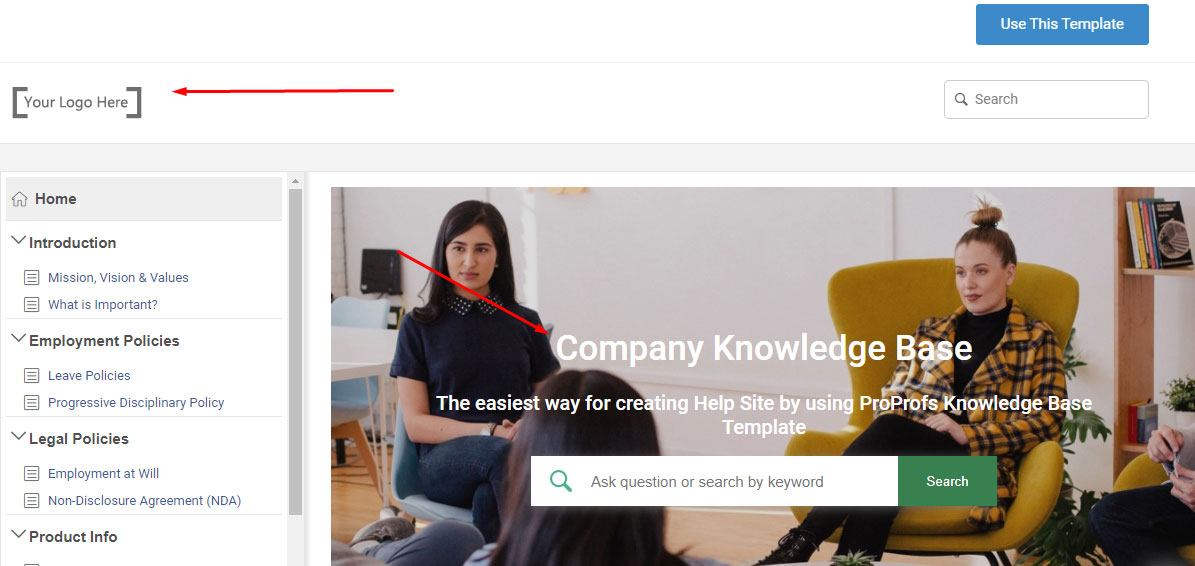
Templates provide you a starting point, making the entire process of content creation a breeze. All you have to do is replace the dummy content with relevant information, add your company’s logo, brand name, and get started.
#2 Write Useful Content
You can either write fresh content or import existing content spread across files, directly to the document. Whichever way you choose, ensure that you add the following sections in the document.
- Company mission, vision, and values
- Employee policies related to leaves, compensation, promotions, safety and security, code of conduct, and the like.
- Employee attendance
- Payslips and related details
- Employee directory
- Roles and responsibilities of employees at different levels
- Information about your offerings, clients, and projects.
You can create sites for different departments in your self-service portal. For instance, the sales division can have its own self-service site and the production department can have its own.
This keeps the entire self-service platform tidy and organized, ensuring that employees look for information on their respective department’s site.
#3 Structure It in a Logical Way
Have your content ready? It’s now time for some contouring.
Remember that no matter how valuable your content is, it won’t make the right impact if it’s not in good shape. Instead of browsing a choc-a-bloc self-service portal, your employees will rather prefer asking for help over email, call, or in-person.
Here are a few tips to give a proper structure to your ESS platform –
- Create short paragraphs. The maximum length should be no more than 4 or 5 lines.
- Have short and actionable headings
- Highlight key phrases or sentences in bold or italics
- Remove fluffy content and ensure that each section delivers something valuable to readers
- Bullets are great to capture readers’ attention. Use them wherever possible.
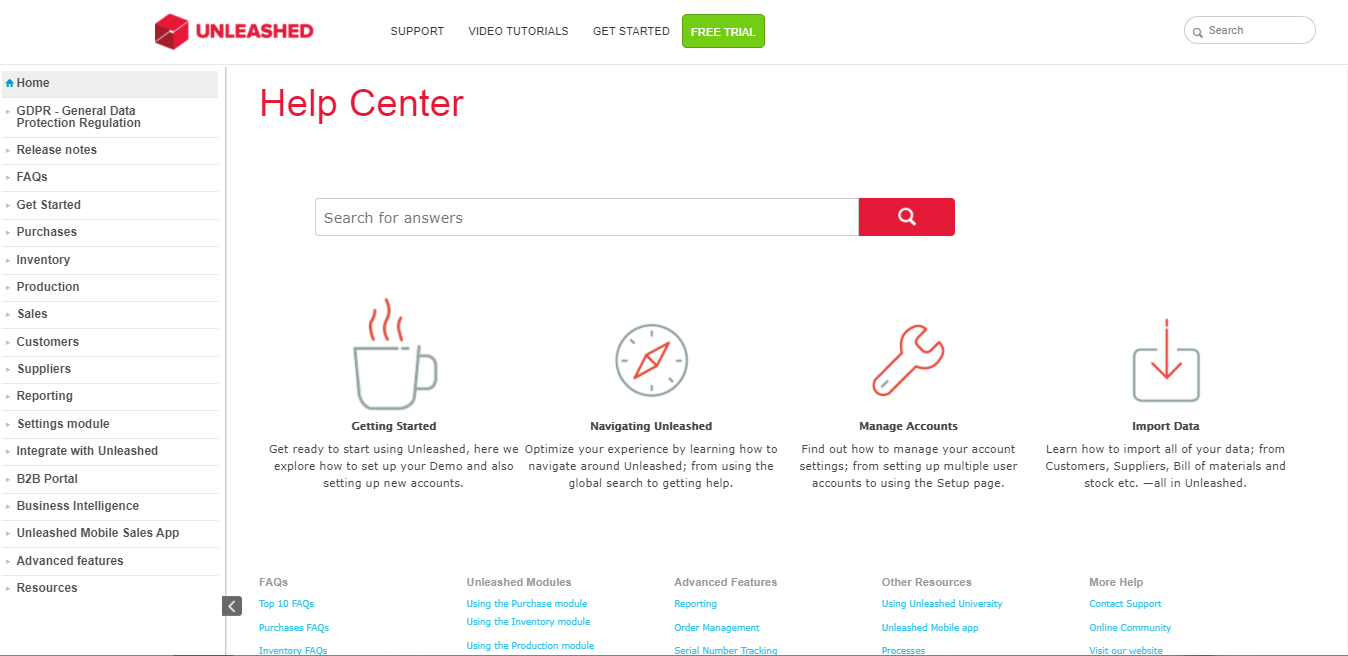
You can have a few major sections displayed on the home page and a table of contents to the left. This will give employees clarity regarding what they can expect further.
Unleashed follows a similar approach. Look at its home page – how well-structured it is.
Scroll further, and you will see that the self-service portal is structured so beautifully. Each article has actionable titles and short bullet points in place.
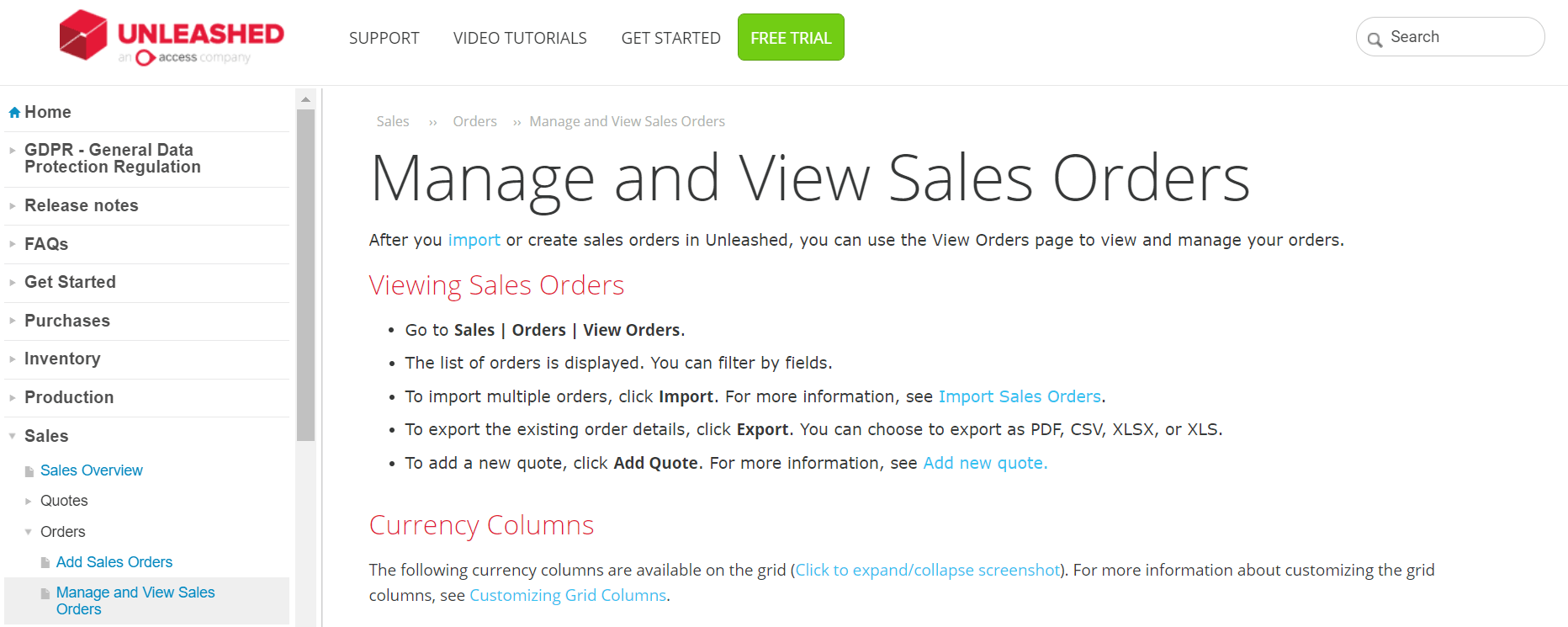
Giving a proper structure to your ESS portal can turn it from good to great.
Read More: Turn Employee Training Effortless With Training Documentation
#4 Make It Visually Attractive
Content quality is the most important thing to consider while creating a self-service portal, but there is no harm in giving considerable attention to the designing part.
It will enhance the overall browsing experience of employees.
While designing the self-service platform, here are a few things to keep in mind:
- Add images and videos at specific places where you feel employees will need detailed information
- Use font styles that are easy on the eyes and simple to understand.
- Use different colors for different sites. Each site should have a distinct branding. For instance, your sales site can have light purple as a major color, while the product site can have light green as the dominant color.
- Have company logo or department name as the header and page number as the footer, or vice versa across your self-help portal
- Add a welcome page and a thank you page at the beginning and end of each site respectively.
See these design best practices in action in the below given examples.
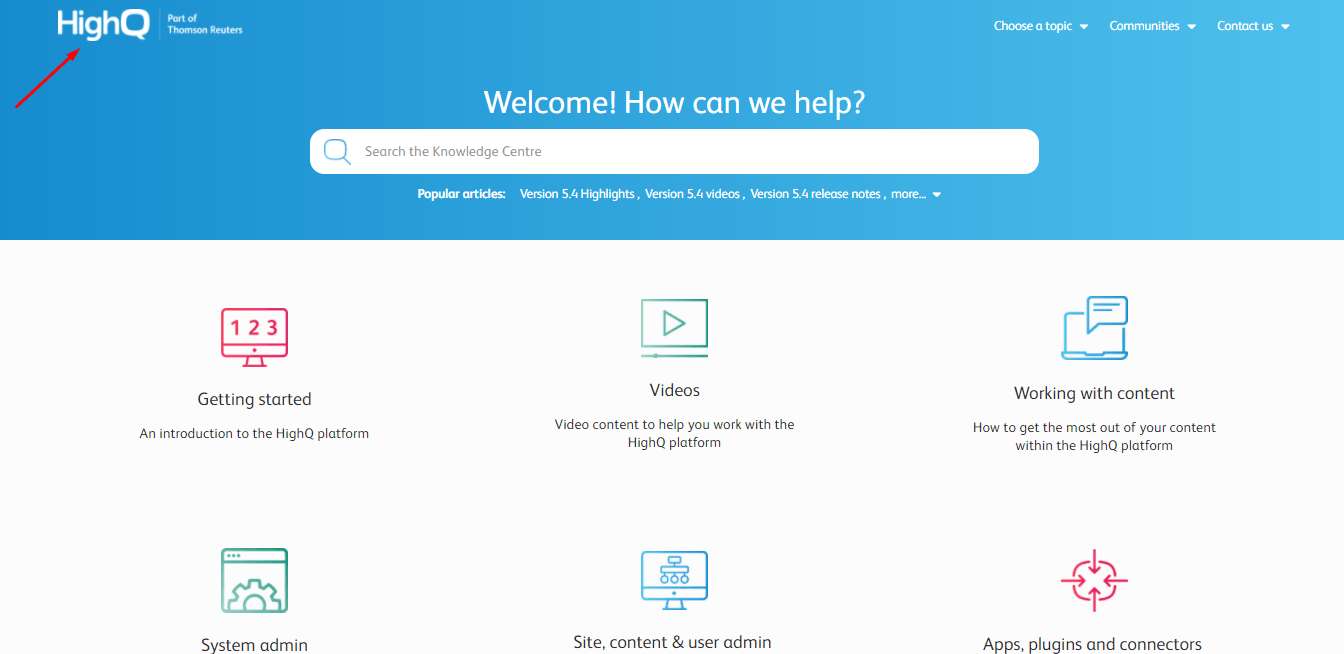
The company logo is added on every page and the colors blue and white are used across the self-service portal.
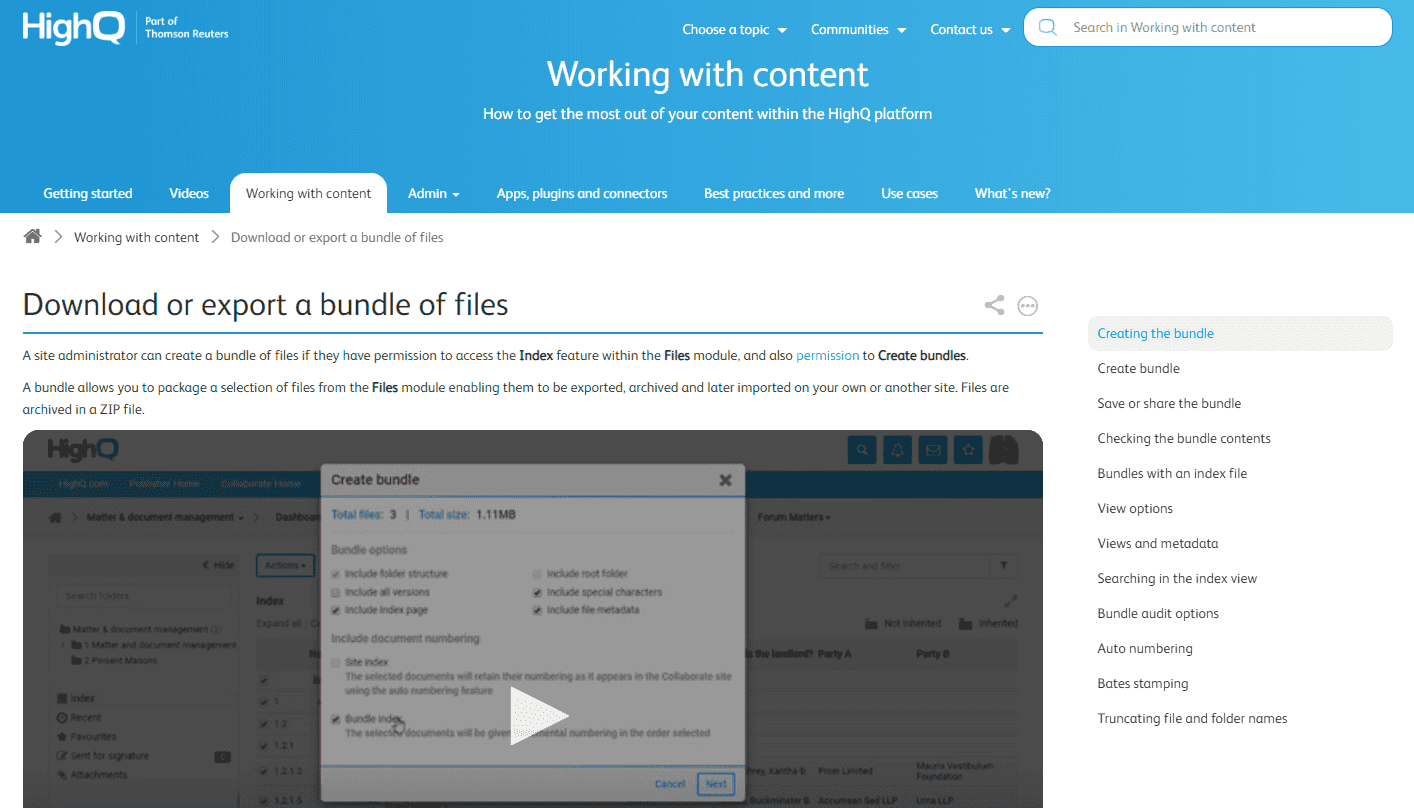
Images and videos are used generously across HighQ’s portal as you can see in the screenshot above.
Giving a beautiful design to your self-service platform increases the likelihood of employees using it for problem-solving.
Read More: Self-Service Portal – A Quick Start Guide
#5 Provide a Hassle-Free Search Experience
The primary objective of your self-service portal is to aid employees to find answers to their questions quickly. That can happen only when you have a powerful search system that works as fast as Google.
Your employee portal should have a prominent search bar that gives relevant suggestions even before an employee finishes typing the question.
Here’s an example to show you how it works-
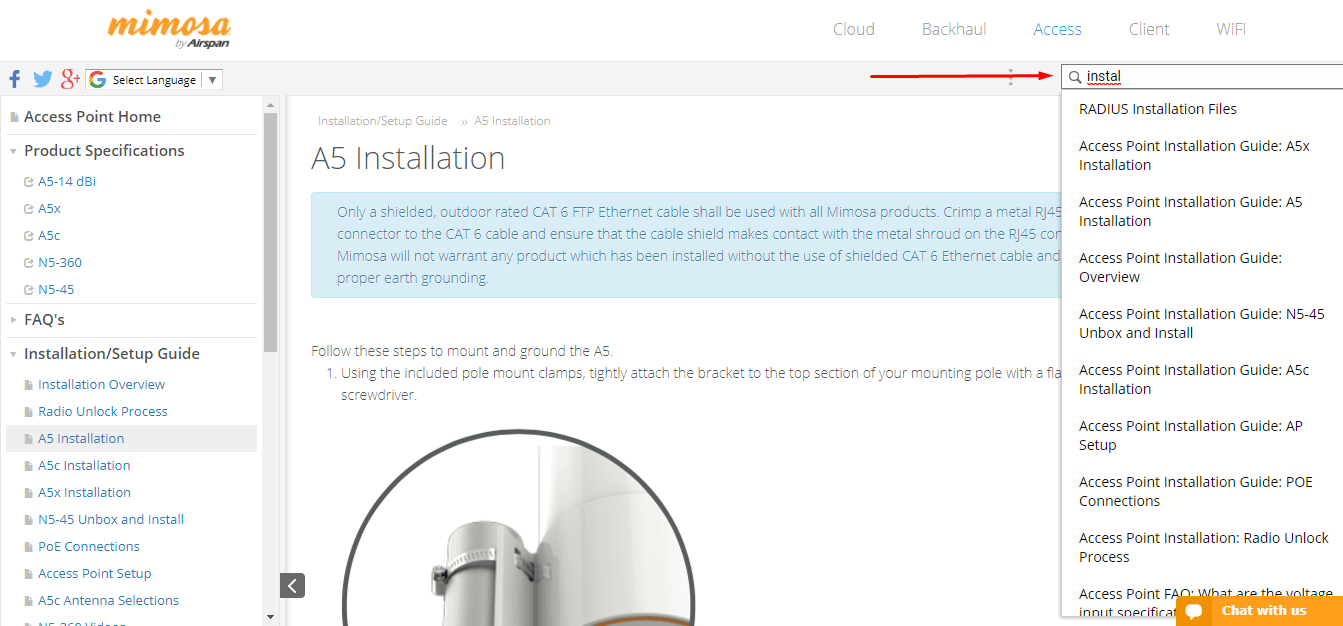
Can you see the content suggestions provided on typing – SSID. That’s how quick and efficient Mimosa’s search system is.
To ensure that your employee self-help portal delivers instant and accurate search results, find the keywords frequently used by employees. Reports can help you here. We will be discussing them in detail in the next section.
Add these keywords to the articles where they belong. Remember not to overstuff your articles with keywords. Use them in a way that they naturally blend in the article.
#6 Allow Employees To Give Feedback
How do you know whether employees are finding your self-service portal helpful?
There is only one way to get this right. Ask them to give feedback on the articles.
You can add a standard question at the end of all articles. The question can be – Was this article helpful?, with Yes/No as the answer options. When an employee selects No, a comment box appears where he or she can share feedback.
HighQ shows us how this is done –
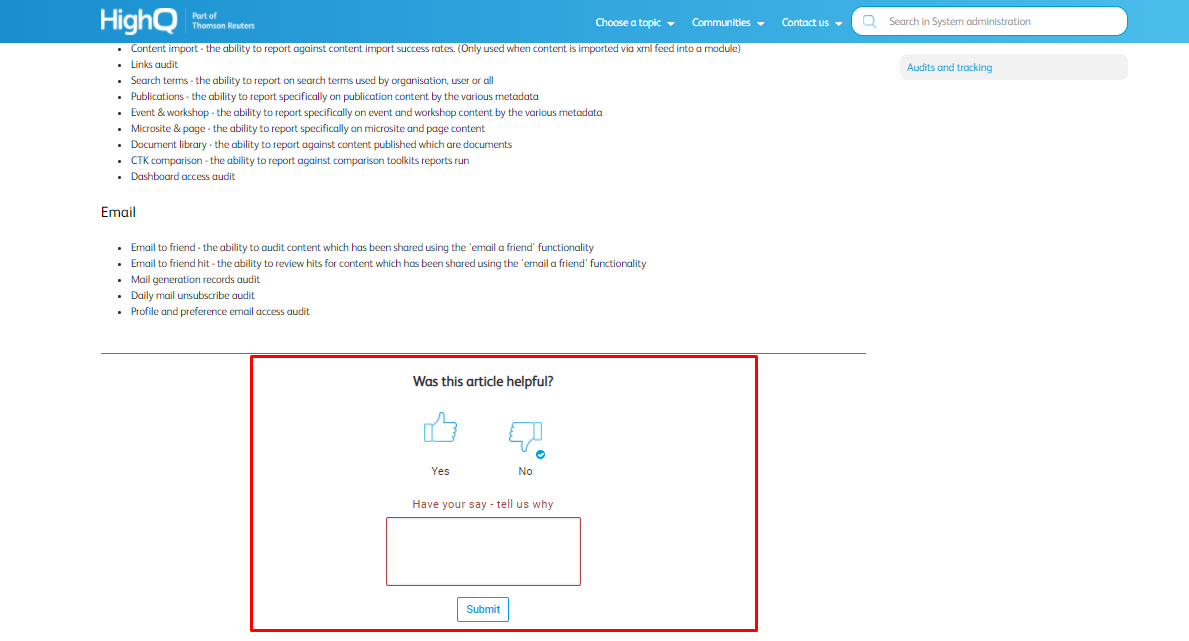
You will get this feedback directly in your email.
An easy way to know how employees feel about your self-service portal, isn’t it?
Watch this video to learn more about how you can capture employee feedback from your self-service platform.
#7 Analyze, Improve, Repeat
After you build your employee self-service platform, it’s essential to keep improving it from time to time. That can happen only when you measure its performance regularly.
Reports can be of substantial help here. They give a detailed analysis of how adept your self-service platform is in solving employees’ problems. With reports, you can get meaningful insights into –
- The keywords not delivering accurate results
- Articles that are poorly rated by employees
- Links that do not provide valuable information
- A total number of searches made by employees, and much more.
This data is all you need to improve the quality of your self-help platform and enhance its performance. For instance, you can use the failed keywords and create fresh self-service articles on them, so next time employees use those keywords, they won’t be disappointed.
Watch this video to learn more about reports and how they work.
How can you understand what makes an ideal employee self-service system? You might have your own definition of perfect, but how do you know whether that definition is correct?
Presenting you with the critical employee self-service features that the portal must have. When you build an ESS, ensure that it comprises all these features, only then can it be labeled as ‘Ideal.’
Key Features Your Employee Self-Service Portal Should Have
1. Online Login and Logout
With an online punching system, employees can log in and log out easily even when they are traveling for work or working from home. Tracking employee work hours also gets a lot easier with this system in place.
2. Payslip Generation
Employees can access current payslips as well as payslips of the past few months via your ESS anytime they want. No more printing payslips or emailing payslips separately to employees!
3. Attendance Tracking
An employee self-service portal makes it easier for your employees to track their attendance, make online corrections, and keep it updated for payroll processing. In case of a discrepancy, they can request changes and get it corrected.
4. Income Tax Declaration
With an ESS portal, employees can make income tax declarations easily. This makes it easy for the accounts team to track the declaration made and calculate tax and revise the salaries accordingly.
5. Real-Time Notifications
Policy updates, shift changes, upcoming holidays, or anything else – an employee self-service portal keeps track of everything and notifies the concerned individuals from time to time.
6. Shift Timings
If your company operates in three to four different shifts, it can make the entire shift management process quite cumbersome for you as well as your employees. An employee self-service portal provides employees access to all information related to work shifts. Employees can check their shifts, request for a shift change, and keep track of shift timings.
Read More: What Is Customer Portal Software and Why Is It Important?
Over To You
Are you ready to build an impressive self-service platform for your employees?
All you need is the right knowledge base software with powerful features to get started.
Once you have that, consider half of the job done. Choose the right template that matches your requirements, add relevant content to it, structure the information, focus on its design, ask for employee feedback, and keep improving and updating the portal.
It looks easy, right?
If you have any suggestions, mention them in the comments below.
Do you want a free Knowledge Base?
We have the #1 Online Knowledge Base Software for instant self-help