

Whether you are a startup or a well-established organization, knowledge management will always be a crucial part of your success story.
Despite realizing its importance, many organizations fail to manage their information assets which becomes a roadblock in the smooth functioning of internal processes.
This eventually impacts your team’s efficiency, performance, and by that extension, your business growth.
Implementing a knowledge management strategy can be a viable solution to this problem. A thoughtful strategy helps you centralize business information, reduce work silos, and promote a culture of collaboration.
Dive into this blog to learn the essentials of a knowledge management strategy, its benefits, and how you can create one for your business.
Let’s go!
What Is a Knowledge Management Strategy?
A knowledge management strategy is a well-defined plan that helps you capture, store, manage, and share your company’s crucial information. With a powerful strategy in place, you can democratize your business knowledge so that employees can access it at their fingertips whenever they need it.
When well-aligned with your long-term goals, a knowledge management strategy can help you achieve several benefits, from streamlined communication and collaboration to improved productivity.
Benefits of Creating a Knowledge Management Strategy
To get a better understanding of why KM strategies are crucial for your organization, let’s look at the benefits they bring to your business:
1. Improve Decision-Making
A powerful knowledge management strategy eliminates all the back-and-forth that goes into the process of content discovery. With quick access to critical business information, employees are better positioned to make the right decisions at the right time.
Whether employees are working on a project, preparing a presentation, or in the middle of a client meeting, making informed decisions comes naturally when they have useful business insights at their disposal.
2. Speed Up Employee Onboarding
The entire process of introducing someone new to your company is quite lengthy. Often, new hires take a long time to find their footing in a new environment and understand the new rules while at the same time focus on their performance.
The right knowledge management strategy can aid their onboarding process, ensuring that they get up to speed faster. You can introduce new hires to your company policies and guidelines and provide proper product knowledge training about the product, client, and more, all under one roof.
When new employees have a single source of truth comprising all necessary details related to your company, clients, and processes, they will have complete clarity on what they are supposed to do right from day one.
3. Provide Better and Faster Customer Service
One thing that can make your organization successful or fall deep into the pits is your customer service. There is no way that you can run a profitable business in the long run if the people you are serving are unsatisfied.
A knowledge base software in action can address your customer service woes in seconds.
On the one hand, it empowers customers to self-solve problems, and on the other, it enables your support staff to respond to tickets faster and keep the resolution time to a minimum.
This helps boost your customer service endeavors and takes the customer experience several notches higher.
4. Boost Employee Productivity
The size of your team doesn’t matter if their productivity level is low. An organization with ten productive employees will reach its target faster than a company with a team of 25 employees but with a lesser productive rate.
An environment where your teams have access to all the necessary information can be a big productivity booster. This is where a knowledge management system comes into the picture. It saves employees from indulging in the tedious to and fro and an endless loop of emails to get the information they need.
As the time spent on such tasks is reduced, employees can remain focused on the work that really matters.
Types of Knowledge Management Strategies
Now that you know how developing a knowledge management strategy can benefit your organization, it is time to understand the various strategies to choose from.
1. Motivate Employees to Take Desired Actions
Are your employees happy with the work environment? Do you offer rewards and benefits to keep up their spirit? Does everyone feel validated and approachable in the workplace?
Well, asking these questions can make a huge difference for every team member.
No one is going to go the extra mile unless there is something in it for them. This is why one of the best strategies of the knowledge management process is to motivate your employees. Offering rewards like salary increments, promotions, and performance ratings can push your employees to participate in the knowledge sharing process actively.
2. Encourage Teams to Collaborate
Collaboration is the best way to elevate knowledge sharing across teams with a knowledge sharing platform. When employees with different skills work together, the results are bound to be marvelous. They can share their unique insights and skills with each other, which further brings innovation and creativity to the workplace.
Deploying tools like MS Teams, Slack, and Google Meet make it easy for employees to communicate on projects and collaborate seamlessly, even when working remotely. During these conversations, they can discuss ideas, put forward their opinions, and then settle on what’s best for the company.
3. Analyze the Captured Knowledge
No matter how much information your knowledge base has gathered over the years, it is of little value if it lacks accuracy and relevance. This is why it is necessary to thoroughly review every KB article that goes live for your employees to consume.
Assessing the content’s quality before publishing can help you identify gaps, errors, and inaccuracies, so you can address them on time. Proofreading and analyzing the content will also ensure that you do not publish everything that your team provides. Only the necessary information goes live in your knowledge base.
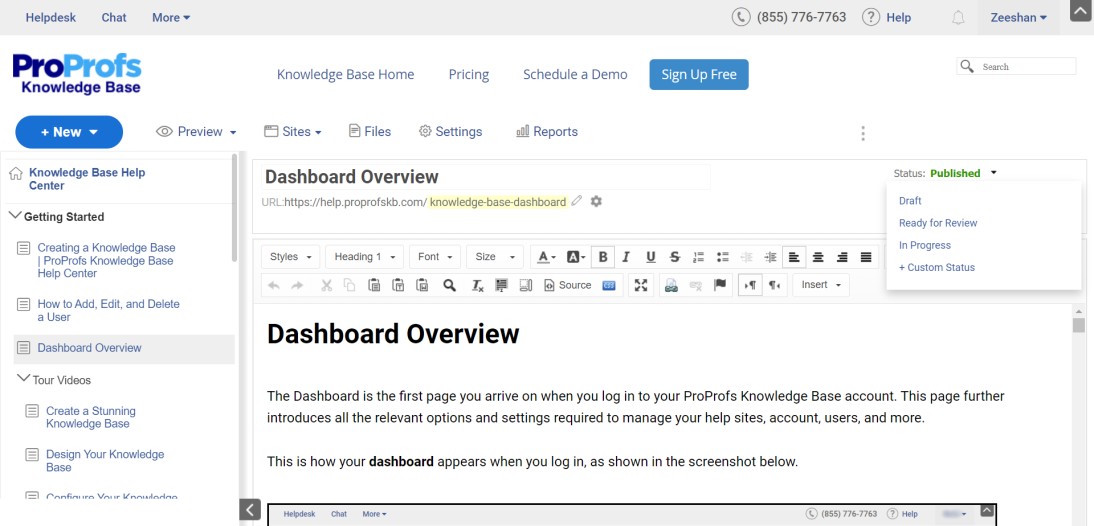
Modern knowledge management tools provide a built-in workflow review and approval system that lets you track articles right from the time they are created till they are published and all the review cycles they undergo along the way.
This can be done by assigning a relevant status to articles, such as – Draft, In Progress, Ready for Review, or a custom status defining the current state of an article.
4. Turn Your Knowledge Into Structured Content
Creating content is one thing but knowing how to present it to people is a whole different art. It is important that you offer content that is not only well-researched but also well-presented.
When scattered information is brought on a centralized platform and given a proper structure, it is easier to navigate, read, and consume. Structuring involves creating a table of contents with all topics listed clearly and a home page that gives a glimpse into your knowledge base content.
Also, your knowledge management platform should have short paragraphs and bullet points to ensure that information is easy to follow. Additionally, you can interlink related articles to help employees switch to the desired page in just a few clicks.
How to Build a Powerful Knowledge Management Strategy
Now that you know the importance of a knowledge management strategy, here is how you can build one for your organization.
1. Define Your Goals
Is your organization working towards improving internal communication? Are you aiming to elevate your customer service?
Are you worried about the rising siloed work culture and looking for a solution?
The first step to implementing knowledge management is clearly defining the goals you aim to accomplish in the end.
Having clarity about your business goals will help you identify the areas that are working as a barrier on the way to reach greater milestones. Once you are aware of your objectives, you can develop a KM strategy that targets those gaps and lets your organization achieve both short and long-term goals.
Also, analyze how your knowledge management strategy will positively impact the way your employees work and departments function. Spot areas that will be most beneficial with the implementation, and then take your next steps accordingly.
2. Assess the Current State of Knowledge Management
Assessing the current state of knowledge management will help you identify any gaps or hindrances in the plan. You can then work on the same and chuck out any obstacles coming in the way of achieving your goals.
A detailed knowledge audit brings to spotlight how information is currently being used across departments and if there are any instances of teams working in silos.
This will also draw your attention toward how knowledge is shared with teams, the tools that are being used, and the inefficiencies existing in the current processes.
Knowledge audit paves the way for necessary changes and can help give the right shape to your knowledge management plans and strategies.
3. Build a Strong Team
You should have people on your team who understand the importance of knowledge management and sharing.
Having the best people onboard will bring new ideas and dimensions to your existing plan. They will bring forth their unique experiences and insights that will help shape your knowledge management portal. Right from creating and editing content to reviewing, managing, and finally publishing it, this team will take charge of every single step going into the process.
Confusion is likely to ensue once your team starts working together, which is why deploying a knowledge management tool is essential.
The best tools on the market allow you to define the roles and permissions of each member, so your team can work together under a single roof with complete clarity.
Watch this quick video to learn how teams can work in collaboration to build your knowledge management system.
4. Develop a Clear-Cut Roadmap
Laying out a roadmap gives every person involved a clear picture of how things are going to move in the process.
This roadmap must include everything from the various stages involved in knowledge management, different milestones to be achieved at different stages, and the final goals to be accomplished. The roadmap should be prepared and explained in the easiest way possible so that your team can understand it in a go.
Decide how you will be communicating your knowledge management goals with the team, what timelines should be set for the process, and the milestones to be accomplished.
It is also essential to keep going back to the roadmap you prepared. With time, there are high possibilities that you might explore new dimensions that you didn’t realize initially.
5. Define the Content Guidelines
Anyone working towards creating content for your knowledge management system must be abreast with the content guidelines in order to produce a well-structured information hub.
Working without a clear content framework can bring inconsistency to your knowledge management system. When your team follows a similar format across articles, your knowledge management platform will look more uniform rather than a cluttered hub of different content pieces brought together.
As part of the content guidelines, you can define the structure and styling to be followed, the ideal length of each article, headers and footers, and all such design elements that can impact the overall presentation.
6. Get Your Hands on the Right Knowledge Management Tool
For your knowledge management strategy to bring the desired results and enable knowledge-centered support, it should be supported by a strong, feature-rich tool.
Getting your hands on the right software is pretty challenging, given the plethora of options available online.
So, how do you bring the right knowledge management tool home?
For starters, you must know what works best for you. Jot down your requirements and then shortlist a few tools.
When selecting the tools, look out for some key attributes and features such as
✅ Ease of use – Can you set it up and use the tool without any coding skills?
✅ User access controls – Can you assign roles and permissions to users for collaborative authoring?
✅ Content Authoring – Does the tool have a built-in content authoring system with the necessary features?
✅ Built-in Reports – Does the tool offer built-in reports for assessing content performance?
✅ External Integrations – Does the software integrate well with third-party tools?
Ensure that you check for such knowledge management features before zeroing in on a tool.
Watch this video to learn more factors to consider before choosing your KM tool.
Power Your Knowledge Management Efforts With the Right Strategy
The abundance of scattered information can turn into mere waste if you don’t know how to store, manage, and share it.
By creating a robust strategy, you can up your knowledge management efforts and reap long-term benefits in the form of improved team productivity and work efficiency.
Coming up with strategies that are well-suited for your organization’s goals can be a bit tricky. However, with a few simple steps, like the ones mentioned above, you can get a powerful strategy ready in minutes.
To start with, you need to be clear on your goals and carefully evaluate the current state of knowledge management in your organization. Next, build a strong team and create a well-defined roadmap that can guide you on the right path throughout the process.
Lastly, you also need the support of a robust knowledge management tool to make things work the way you want.
While there are multiple tools on the market, we assure you that ProProfs Knowledge Base Software is going to be a safe bet. Simple to set up and packed with the best features, this tool can help you achieve lasting success with your knowledge management initiatives.
FREE. All Features. FOREVER!
Try our Forever FREE account with all premium features!