

The amount of information generated by enterprises today is mind-boggling.
Imagine the number of emails with critical business information shared by teams and the amount of knowledge that silently sits in Google Drives and PPTs.
These are intellectual assets that, if managed and utilized effectively, can substantially increase your growth prospects.
Luckily there is a way to do that. With enterprise knowledge management, you can give all scattered knowledge a centralized home where it can be securely stored and accessed by employees.
A dedicated knowledge management system ensures that information doesn’t fall through the cracks and is instantly available when employees need it the most.
In this guide, we will learn about enterprise knowledge management in detail, including its benefits and methods. We will also explore the tools that can boost the process of knowledge management in your enterprise.
What Is Enterprise Knowledge Management?
Enterprise knowledge management is the practice of consolidating business information in a centralized platform and making it easily accessible for everyone in your organization.
Put more specifically, it refers to using advanced technological solutions to capture, organize, and share knowledge within your company. Doing so opens up the knowledge pathways and offers your employees on-demand access to any information they need. This allows them to learn faster and work efficiently towards achieving your business goals.
Benefits of Enterprise Knowledge Management
Adopting an enterprise knowledge management platform can positively impact your business. Let’s learn about the key benefits it offers.
Promotes Learning and Development
Did you know that organizational silos act as the biggest productivity barrier for 55% of companies?
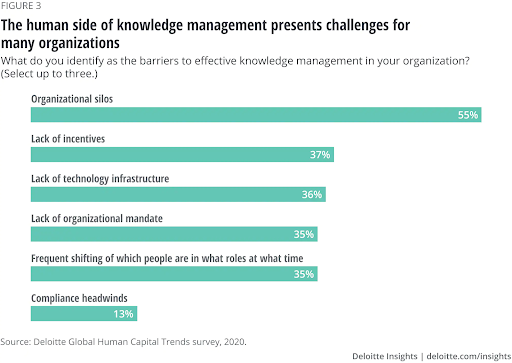
Enterprise knowledge management can significantly reduce information silos by centralizing all business knowledge and making it easily accessible to all employees. It encourages employees to share best practices and insights on a common platform so everyone has access to collective wisdom. This way, information is not hoarded by specific individuals or teams.
Helps Employees Make Informed Decisions
We know that the inaccessibility of business information can lead to employees making poor decisions, the consequence of which can be detrimental to your organization.
Enterprise knowledge management ensures that everything your employees need is right at their fingertips. So, whether employees are interacting with a customer, working on a presentation, or a project, they can make faster and smarter decisions. This also eliminates all the guesswork and helps employees achieve the results they want.
Boosts Team Collaboration and Productivity
Enterprise knowledge management allows employees to share their ideas, insights, and experiences on one single platform. This paves the way for collective content creation, where each employee gets the chance to contribute meaningfully toward knowledge management. Such knowledge sharing boosts inter and intra-department collaboration and also enhances team productivity.
Read More: 15 Hot Knowledge Management Trends for 2023
Prevents Knowledge Loss
Employees are the most significant source of business knowledge. Whenever an employee retires or resigns, the valuable knowledge they have captured over a period of time also leaves with them.
The implementation of enterprise knowledge management helps combat this loss. It allows your employees to regularly document their subject matter knowledge so that even when they leave, the knowledge stays with your company.
Read more: Knowledge Transfer – What it is & How to Achieve it?
Enhances Employee Onboarding
Onboarding employees and familiarizing them with your company culture, goals, and processes is no easy task. It requires a lot of effort from the HR team to help new hires gain clarity and work confidently. Adopting enterprise knowledge management software can take the load off your HR team by automating the onboarding process. This way, new employees can independently complete the onboarding without relying too much on your HR team.
Methods & Techniques to Achieve Enterprise Knowledge Management
You can use various methods and techniques to reap the advantages of enterprise knowledge management. Following are some of the methods you can adopt:
Adopt the Right Ways to Capture Knowledge
To document and utilize knowledge, you need to identify the right sources to capture it.
Conducting brainstorming sessions is one way of capturing knowledge. Such sessions give employees an open platform to discuss key business issues and find relevant solutions. The results can then be broken down into small chunks for easy consumption and documented for internal use.
Conducting meetings before a project begins is another way to collect knowledge. In such meetings, you can invite all team members and encourage them to share their past experiences and expertise gained by working on similar projects.
Additionally, you can also discuss the project outline, goals, and expectations in these meetings to ensure everyone is on the same page.
Encourage Teams to Work in Collaboration
Collaboration is essential for different teams to work in alignment with each other and successfully achieve business goals. It creates a workplace where individuals can share insights, communicate experiences, and voice their opinions on different aspects of the business. This knowledge can then be documented in an internal knowledge base and shared for everyone’s learning.
Modern knowledge base software allows seamless team collaboration by defining the roles and responsibilities of each individual. As all members of the team are aware of their respective roles, they can work together with more clarity and efficiency.
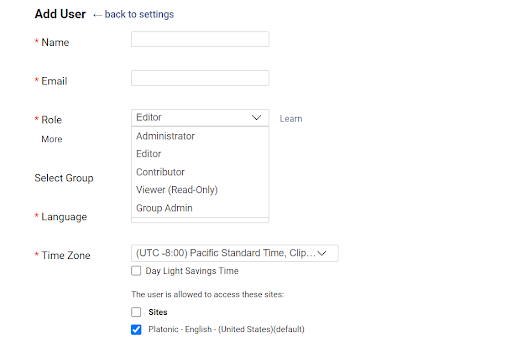
Such a collaborative workspace is the breeding ground for innovation, with everyone bringing their unique skills to the table.
Structure the Captured Knowledge
Giving the information collected a logical structure is crucial to make it easy to discover.
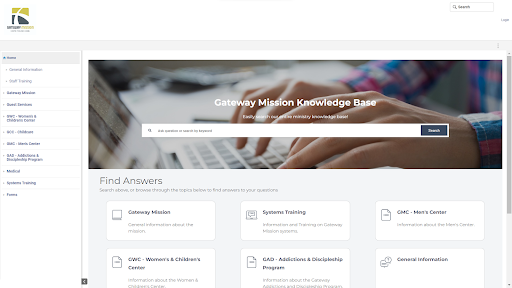
There should be a home page that lists all the contents of your knowledge base. This is where employees can get an instant glimpse of what’s in store for them. Create topic-relevant categories and subcategories where all information can be systematically added.
Another important thing to remember is the logical hierarchy of the topics. Start basic and then drill down towards more advanced topics. This way, employees will not get overwhelmed at the start.
You can also interlink relevant articles to make navigation easier.
Here’s an excellent example of a knowledge base with well-structured content.
Run a Review Process for Performance Improvement
Once you are done with documenting and structuring the information, it’s time to run a systematic review process.
With a review system in place, your contributors and editors can check each article for accuracy, find and fix errors on time, and make sure the published content is flawless. For articles that need to be enhanced, contributors can take the assistance of subject matter experts.
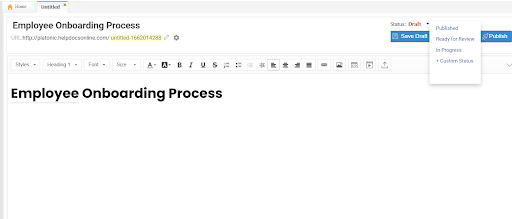
Workflows offer the best way to review knowledge base content. For each article, you can set a status depending on its stage.
For example, if the article is written, its status can be set as “Ready for Review”. Editors can pick the article for review and pass it on for publishing.
Software to Implement Enterprise Knowledge Management
To manage enterprise knowledge successfully, you need to adopt some essential tools. These tools help your employees efficiently manage knowledge, communicate effortlessly, and share feedback and suggestions.
Let us look at the types of software you can adopt for enterprise knowledge management.
Knowledge Management Software
Knowledge management software helps you create a centralized repository of business information that can be easily accessed by employees anytime and from any device. Such a system is usually managed by a team of contributors and editors who take care of the entire process, right from content creation to publishing.
Modern-day knowledge management tools feature a powerful reporting system that analyzes your content and provides useful insights into what’s working and what’s not. Most of these tools can be integrated with Slack and Jira to help you boost workplace efficiency.
ProProfs Knowledge Base is an excellent example of enterprise knowledge management software. It is a feature-loaded tool with granular access controls, in-depth reporting, and powerful external integrations that help you efficiently manage enterprise knowledge.
Communication Tool
Communication is vital for the successful implementation of enterprise knowledge management. A unified communication tool with instant messaging, calling, and conferencing capabilities allows your teams to discuss requirements, expectations, and feedback with each other on a single platform. Employees can address issues right when they arise without getting stuck in the never-ending email loop.
Slack is one such tool that helps employees communicate and share information in real-time. It groups messages into channels so your team can easily view every piece of communication and effectively manage tasks.
Read More: Internal Communications: Top 10 Benefits, Best Practices & Tools
Project Management Software
Employees can collaborate and work more effectively with a project management system. It brings all projects and teams under one roof, thus allowing seamless collaboration and knowledge sharing. Such a tool allows teams to assign tasks, set deadlines, track progress, and balance responsibilities.
Checkout the Best Project Management Softwares
Employee Feedback Software
Analyzing employee feedback helps you determine the success of your knowledge management efforts. You can use a tool like ProProfs Survey Maker to create customized surveys for capturing employee feedback on your knowledge management system. Using this tool, you can add survey forms to your knowledge base articles to help employees share feedback right away.
The feedback you receive can be further analyzed to improve the quality of your enterprise knowledge.
Practice Enterprise Knowledge Management to Fast Track Your Business Growth
Enterprise knowledge management is crucial for business growth. It allows teams to work as one unified group, sharing their experiences and observations with each other.
Enterprise knowledge management significantly improves productivity and decision-making by giving employees a single source of truth. Employees can communicate seamlessly and learn on the go. While enterprise knowledge management benefits are many, they can be reaped only if you get the implementation process right.
You can start implementing enterprise knowledge management by following a few simple steps. Start by identifying the sources of this knowledge, encourage teams to collaborate, and build a structured workspace.
Adopting enterprise knowledge management solutions such as knowledge base software, project management, and employee feedback tools can further aid this process.
FREE. All Features. FOREVER!
Try our Forever FREE account with all premium features!