

New employees tend to spend weeks or sometimes even months learning the ropes of their roles and becoming productive resources.
In a similar vein, existing employees spend hours each day sifting through chaotic files and folders, emails and chats, to find the information they need to complete their daily goals.
There is one thing common in these situations – both are productivity killers!
When productivity hits hard, performance suffers, which eventually becomes the reason for your company’s slow growth.
Sounds familiar?
Worry not. We know what you need – an enterprise wiki software to turn your workforce into a productivity powerhouse.
Let’s unravel the basics of what is an enterprise wiki and then move on to how you can create a wiki using the enterprise wiki software.
What is an Enterprise Wiki?
An enterprise wiki is a company-wide collaboration and knowledge sharing platform, more like a private Wikipedia, that employees can use to get answers to any questions they have around their roles, business processes, company policies, and much more.
It is a reliable, single source of truth that can be accessed 24×7 across all devices, giving rise to a culture of any time, anywhere learning. As a centralized information resource, an enterprise wiki is created collaboratively by employees who are responsible for contributing content as well as keeping it up to date.
Top Benefits of an Enterprise Wiki
Most businesses are still not sure of what an enterprise wiki is. If you are looking for the real meaning of a wiki and struggling to find significant reasons to create an enterprise wiki for your business, these benefits will be convincing enough.
Being a unified workspace that fosters collaboration and communication, a well-written enterprise wiki offers more benefits than you might think. Some of these are:
1. Boosts Employee Onboarding
A smooth employee onboarding process is key to boosting employee retention and reducing turnover. When that doesn’t happen, employees are likely to leave.
Research shows that a poor onboarding experience makes employees 2X more likely to pursue better opportunities.
Look closely, and you will realize that losing even one employee in a short period of time costs exponentially in terms of reduced employee morale and loss of time, effort, and money you put into hiring.
With an enterprise wiki in place, new hires can learn conveniently at their pace and get familiar with their roles and responsibilities in a short period of time. The wiki is always at their disposal, guiding them at every step of the way, right from day one. This makes employees feel capable of doing their jobs and solving problems independently.
The feeling of being able to contribute meaningfully from the initial days gives new hires a sense of confidence, which further sets the right foundation for the rest of their journey.
2. Increases Employee Productivity
Employees spend an inordinate amount of time digging through scattered emails, files, and documents. This is a big time and productivity killer.
With a well-written and easily accessible enterprise wiki, employees can get help in a heartbeat. No more shoulder taps, shooting emails, or unnecessary back and forth for a simple piece of information. No more embarrassment of asking the same questions multiple times and badgering seniors with trivial issues.
Investing in an enterprise wiki gives employees a one-stop knowledge hub that has the right answers to all their questions. They spend less time looking for information here and there and more time doing the real stuff.
3. Helps in Knowledge Transfer & Storage
Employees gather valuable knowledge after working in an organization for years. The experience and insights they have gained are your company’s assets. What if your employees leave, are sacked, go on a vacation, or fall sick? It can disturb the workflow across teams, leaving others with no option but to do their duties with the limited knowledge they have.
An enterprise wiki ensures that the employee know-who remains in the company, regardless of who resigns or joins. It is a collaborative, unified workspace that helps you capture the institutional knowledge and insights held by employees.
This continuous knowledge sharing is a significant competitive advantage as the knowledge always stays with your organization and plays a key role in keeping your teams efficient and productive.
4. Reduces Errors and Streamlines Processes
Human errors are inevitable, and anyone – an employee who has recently joined your organization and someone who has been working with your company for a long time, can commit mistakes.
It is not possible to completely prevent such mistakes, but you can definitely reduce them with the help of an enterprise wiki.
With business processes, employee roles, and responsibilities clearly documented, there is little scope of confusion. Employees know their duties and even the process to perform them. They know the business processes in and out, the rules they need to adhere to, and the best practices they need to follow at work. This means fewer errors, more streamlined processes, and higher efficiency.
5. Fosters Employee Collaboration
Collaboration and communication are the two main drivers of productivity. This is why corporations invest a lot in building a knowledge-sharing and collaborative company culture.
At a time when collaboration is the need of the hour, firms can use an enterprise wiki to bring teams together and keep them connected. Each department is in charge of specific things, has unique responsibilities, and uses different practices and tools.
At the start, you will have to look for the best incentives that will help employees initiate knowledge sharing. Once one team starts sharing knowledge, the practice will slowly be followed by others. A collaborative platform like this one fosters a strong team spirit by allowing employees to comment and contribute to their colleague’s posts.
Use Cases of an Enterprise Wiki
An enterprise wiki is an internal knowledge resource that can be used in multiple ways to fulfill different goals. Some of the major use cases of an enterprise wiki include:
1. Collaboration Across Teams & Projects
Seamless collaboration is a must for teams to work across projects. There are numerous meetings, presentations, brainstorming sessions, and discussions that take place from time to time. Employees can easily lose track of work if such activities are not recorded on a centralized platform.
An enterprise wiki acts as a centralized project hub that serves as a reference point for project members. If they lose track of development or miss out on something important, they can always visit the wiki and stay on the same page as others. It is like the project’s memory that employees can easily maintain and update collectively for everyone working on the project.
Besides project information, the wiki can house all the best practices, guidelines, reference material, and even contact information of each project member.
In a nutshell, with an enterprise wiki, you can manage projects as well as give teams a unified workspace to collaborate, communicate, and contribute.
2. Employee Handbook for Employee Onboarding
Onboarding newcomers is a big headache for a company’s HR team. The initial few weeks are crucial as they decide whether a new employee will stick to your company or bid goodbye.
Here the wiki acts as an employee handbook, providing new hires with consistent guidance so that they don’t feel stuck at work. Besides introducing them to your work culture and policies, it also explains what is expected from them and what benefits they can expect from you.
This handbook is home to valuable information new employees can use to perform well at work, build relationships with colleagues, and take every step confidently. Most importantly, it gives them a feeling of comfort and assures them that they are not alone and the company is always there to support them.
Read More: How to Create an Excellent Employee Handbook for Your Workforce
3. An All-Inclusive Internal Knowledge Base
Companies often face the challenge of consolidating all their business knowledge, including customer-related information.
An enterprise wiki can also work as an internal knowledge base, the scope of which is not just limited to internal company information. Besides company policies and work procedures, the knowledge base can also include information about your customers, products and services, IT-related topics, and much more.
Such a knowledge base wiki is the one-stop point for teams across customer support, IT, product, marketing, etc. It has department-specific information as well as internal business data, presented in meaningful topics and subtopics that are explained using written text and visuals.
Best Wiki Tools & Their Features
Creating an enterprise wiki requires time, effort, and most importantly, a powerful tool that can take half of the load off your shoulders.
While looking for potential wiki software, remember to check these key enterprise wiki features that are necessary to get the desired results.
- Ready-to-use templates
- Online editor
- Google-like search function
- Enterprise-grade security
- AI-powered, insightful reports
- Access rights, roles, and permissions
- External integrations
- Import and export
- Customizations, and many more.
Evaluate the tools on the basis of these features, the value for money they offer, and the ease of use they provide.
Some of the leading enterprise wiki tools that have most of these main features are:
1. ProProfs Knowledge Base
ProProfs Knowledge Base is known for its simplicity and versatility. This easy-to-use tool helps you create an online wiki, knowledge base, employee handbook, documentation, and any kind of knowledge platform you want. Fully customizable, accessible across devices, and easy to scale, this wiki software offers a bunch of bespoke features that make content creation, designing and publishing a breeze.
Pricing – Starts from $49/author/month
Read More: Top 15 Knowledge Base Software and Tools
2. DocuWiki
A popular open-source wiki software, DocuWiki is loved for its ease of use and maintenance. It has built-in user access controls, numerous plugins, and numerous customization options. Besides an enterprise wiki, DocuWiki can also be used to build user manual software, a corporate knowledge base, and private notebooks. It has low system requirements and supports over 50 languages, making your wiki creation experience even richer.
Pricing – Available on request
3. Zoho Wiki
Zoho Wiki is a robust wiki tool tailor-made to suit your team’s unique needs. Whether your focus is on branding, security, or simple editing – Zoho Wiki helps you do it all. Its customizable workspaces help in content categorization, with each workspace having its own user control and security setup. You can also leverage the integrations with Zoho Creator and Zoho Docs to elevate the potential of this wiki software.
Pricing – Starts at $2.16/user/month
How to Create an Enterprise Wiki That Your Employees Actually Use
Building an enterprise wiki is not easy. Besides careful planning and taking each step thoughtfully, you need to focus on various other things, such as the content you would add and the structure you would like to give it.
Here are some practical steps to create an enterprise wiki that your employees would love to use.
Step 1 – Set Clear Goals
The way a shaky foundation can break the entire house, similarly, a weak foundation can crush all the efforts you put into building a wiki.
Setting the right goals is important to give the entire process a solid foundation on which the rest of the steps depend.
Brainstorm with your teams and identify the problems they are facing. Find out the objective that you want the wiki to fulfill, so you can start creating relevant content and stay focused in the process.
Employee onboarding, team collaboration, or employee training – whatever your goal is, write it down and convey it clearly to your teams. This way, everyone in your wiki team will know that they are working towards something meaningful and that their efforts will bring about a positive change in the organization.
Step 2 – Build a Team
Once your wiki goals are set, build a team that works towards them and helps you create a wiki for your company. Adding the right people in your team is a huge advantage if you are quality-obsessed and want the wiki to be an excellent piece of work.
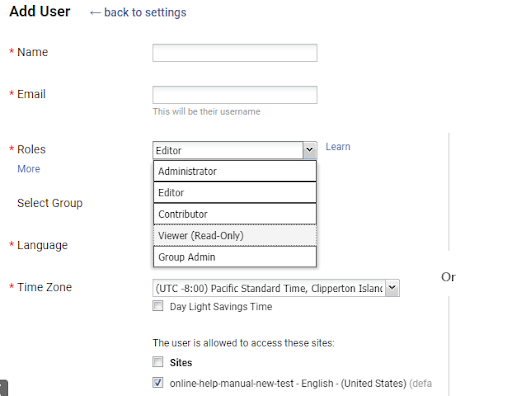
Invite key employees with specialized knowledge to work on the wiki right from contributing content to finally publishing it online. Define what each member of the team is responsible for to avoid any confusion during the process. When each person knows his roles and responsibilities well, they are likely to stay within their defined circle and do justice to the part they are given.
For example, some of the team members can be direct contributors, while others can be editors and administrators. When members with different roles work in sync and bring their best knowledge to the table, the outcome is bound to be flawless.
Step 3 – Set up a Structure
Before your team starts to work on the content, give them a structure to follow.
A structured wiki is easy to navigate and helps employees get what they need quickly. On the contrary, an unstructured wiki looks chaotic and is more likely to get abandoned by employees.
You can avoid this by defining the wiki’s structure right from the start. Decide the topics that you want to add to the wiki and how you would want to display them. Do you need a home page and a table of contents? How many categories and subcategories would you want to create to fit in all the topics necessary for the wiki?
Ask such questions to yourself and to your team. Brainstorm and decide the best structure to make your wiki more user-friendly and searchable for employees.
A strong structure is like a backbone that enables the wiki to function smoothly and do what it is designed to do – help employees solve problems every day at work.
Step 4 – Work on the Wiki’s Content
Now comes the most important part – content.
Content forms the core of an enterprise wiki. So you have got to be more careful while creating content.
Either take a plain slate and write all information from scratch. Another option is to import files directly to the wiki and convert existing content into meaningful wiki articles. You might have some useful company information dispersed across emails, Google Drive, files, and folders. Why waste them when you can use them in the wiki.
Import all these files to your wiki, and you will have a pool of information ready, reducing half of your workload.
Start building content on high-level topics and then narrow down to the less important ones. When you write content, remember that it should be:
- Simple and to the point
- Free of jargon and complexities
- Explained in easy to understand language
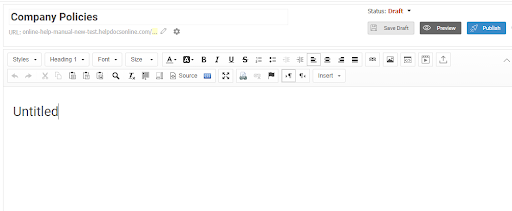
This MS Word-like editor by ProProfs Knowledge Base can help you start content creation on the right foot. Besides writing and editing, the tool has an array of features to help you with the customization of the written content.
Step 5 – Set up a Strict Review & Approval Process
An enterprise wiki is a single source of truth that employees can trust without a doubt. To maintain this trust and ensure that it never breaks, you’ve to put extra effort into keeping the content error-free.
Multiple rounds of reviews of every article and publishing them only after receiving a final go-ahead from everyone in the team is the best way to keep the content quality on point.
A systematic workflow rules and approval system is all you need to keep a constant check on your content quality. Writers can assign a status to every article they work on so that everyone in the team knows its stage. They can even set a custom status to seek help from specific people or those outside the team.
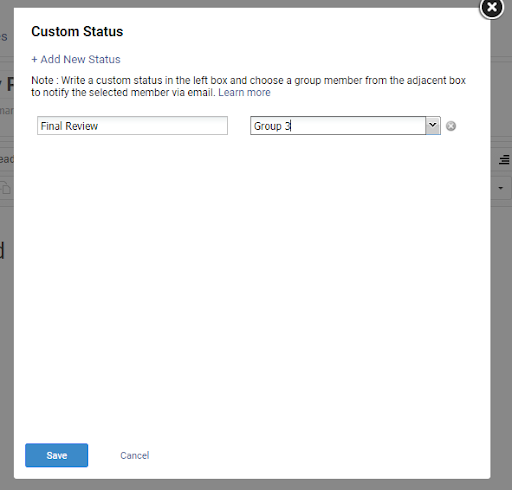
This review system creates more transparency and streamlines the process of vetting the articles and fixing all possible errors before the publishing starts.
Step 6 – Keep Sensitive Information Secure
Being an internal information resource, an enterprise wiki has confidential information that you may not want to share with everyone.
While some topics are general and can be accessed by everyone, some sections of the wiki might contain sensitive information that should be guarded at any cost. Configuring the access rights of employees is therefore important.
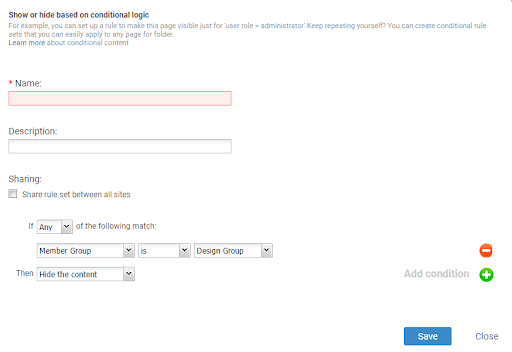
Modern wiki software comes with an enterprise-grade security system that allows you to set specific conditions on the content that you don’t want to be visible to everyone.
For example, if a particular topic has sensitive information that you don’t want the sales team to know, you can simply set a condition to hide it from members of the sales staff.
You can also limit and manage the wiki’s access.
For example, set editing access for some members, and for others, you can allow view-only access. Some can be given administrator access, while others can be allowed to make changes to the content.
This way, you can fully control the access rights of each person and change them anytime you want.
Best Practices to Level-Up Your Enterprise Wiki
Here are some realistic tips and best practices to ensure that your enterprise wiki is a huge success:
- Create a mobile-friendly wiki to help employees access information on the go
- Use the right keywords and tags in articles to ensure quick discovery of information
- Harness the power of visuals and add them wherever possible
- Make your wiki user-friendly and easy to navigate
- Avoid large blocks of text. They can be intimidating and confusing for readers
- Translate the wiki in multiple languages for employees working across different locations
- Link related articles for quick search
- Keep your wiki simple and straightforward and help employees find what they need in a snap.
Ready to Get Your Enterprise Wiki off the Ground?
An enterprise wiki is like a company’s brain comprising a pool of valuable information. This web-based platform makes information search easier and helps you cut through the clutter of dispersed emails, folders, and files.
Besides turning employees more productive, the wiki also boosts team collaboration and knowledge sharing at the workplace. All of this combined sets a strong base for your company’s growth and long-term success.
To create a wiki that your employees can easily understand and use, start by putting a plan on paper. Find out the reasons behind creating the enterprise wiki and the goals you want to achieve. Brainstorm with different teams to understand problems on the ground and then set the right goals.
Next, build a team of employees who will be directly involved in the wiki creation process. Once you have a strong team in place, consider half of your work done. Now decide the wiki structure, start creating the content, and take steps to keep sensitive information secure.
Follow these simple steps and the practical tips given above to kick off the process and get your wiki off the ground.
FREE. All Features. FOREVER!
Try our Forever FREE account with all premium features!